

By Ehtijad Ali
Updated: October 2026
Reading time: about 10 minutes

When people talk about the hidden internet, they often talk about Tor. But Tor is not the only network built for private communication. I2P and Freenet were also made to help people share information with more privacy and fewer central controls.
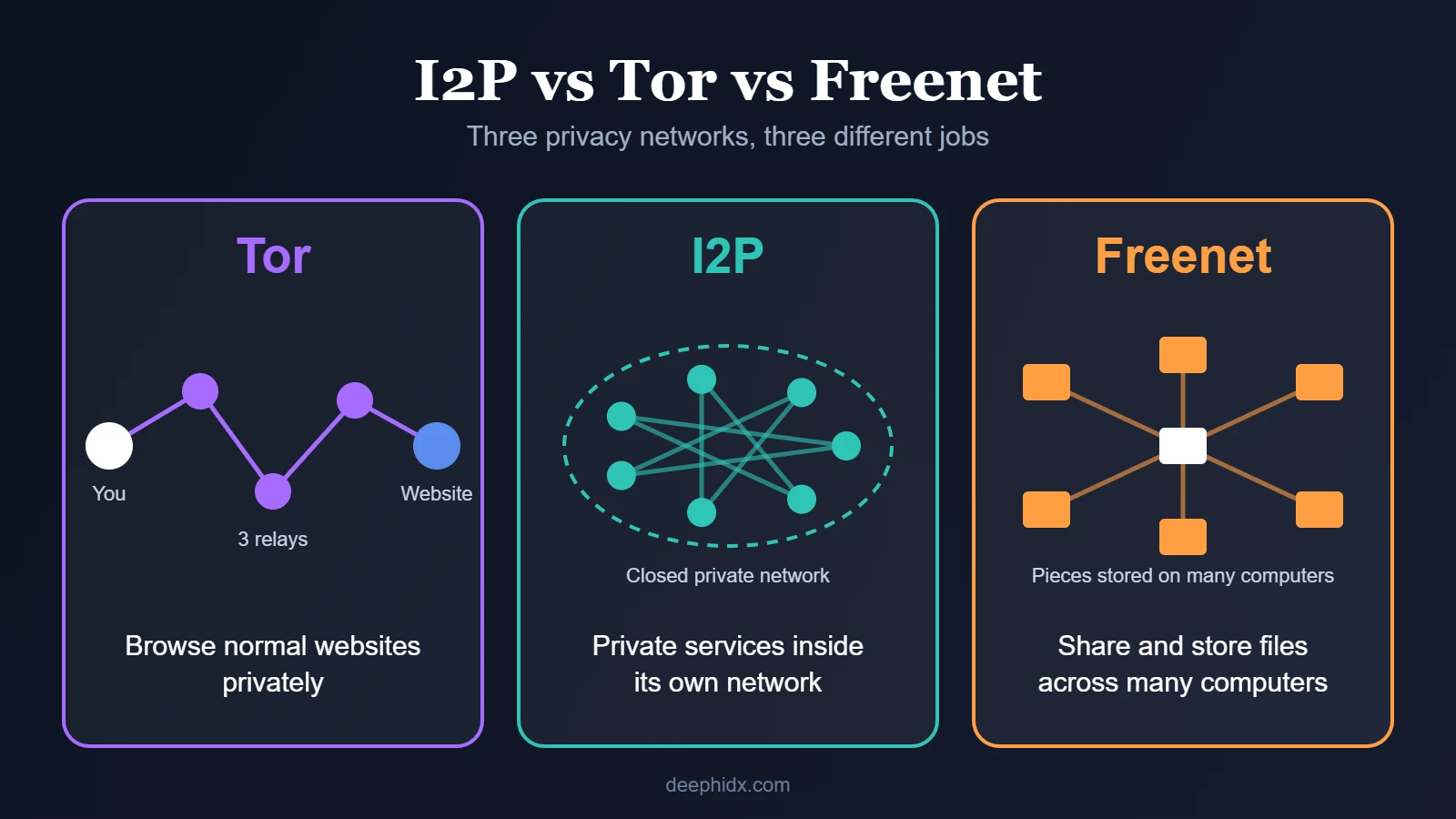
These networks have different goals. Tor helps people browse the normal web privately. I2P focuses on private services and communication inside its own network. Freenet grew from an idea about sharing information even when someone tries to block it.
So, what is the difference between I2P vs Tor, and where does Freenet fit in? This guide explains their history and how they work. It also covers what people use them for and what each network cannot protect you from.
What is in this guide?
What Are Tor, I2P, and Freenet?
Tor, I2P, and Freenet are networks built to give people more control over how they share or access information. They use different designs, so they are not three names for the same tool.
- Tor: A network that helps people browse websites with more privacy and visit special sites called onion services.
- I2P: A private network designed mainly for services that run inside the network, such as websites, chat, and file sharing.
- Freenet: A project that grew from the idea of sharing and publishing information without depending on one central server.
These tools are often linked to the dark web and darknet, but they are not all the same thing. A network is the system that moves information. A website or service is something people use through that system.
For a simple explanation of the hidden internet, read our guide to the difference between the deep web and the dark web.
1. Freenet: The Early Idea of Censorship-Resistant Publishing
Freenet began as a research project by Ian Clarke in 1999. Its main idea was simple. People should be able to share information without needing one company or one central server to keep it online.
Think of a normal website as a book kept in one library. If that library closes or removes the book, people may no longer be able to read it. Freenet explored another way: information could be stored and shared across computers in a distributed network.
A distributed network is one where many computers share the work. They help store or move information, so no single central computer does every job. This can make it harder for one person or group to control everything.
How does Freenet work?
The original Freenet design used computers that shared storage and helped pass information through the network. Data could be stored in a distributed way, making it harder to remove information by shutting down one server.
Privacy was another important goal. The design aimed to make it harder to learn who published a piece of information or who asked for it. However, this does not mean every action is invisible or that every file will always be available.
The original project later split into two paths. In 2023, the original Freenet project continued as Hyphanet, while a redesigned project took the Freenet name. Their designs and goals are related, but they should not be treated as identical systems.
You can read about the project’s history and design in the official Freenet project information.
What is Freenet used for?
The main idea behind Freenet is to support private sharing and publishing. Depending on the project and software version, this can include websites, files, discussions, and other services built on the network.
Its focus is different from Tor’s main use. Tor is mostly used to visit normal websites privately. Freenet’s original design focused more on storing and sharing information across many computers.
2. I2P: A Network Built for Hidden Services
I2P stands for the Invisible Internet Project. It is an encrypted network that runs on top of the normal internet. But it creates its own space for private services and chats.
Imagine a town with public roads and a separate network of private paths. Tor is often used to reach places on the public roads without showing your normal connection details. I2P is designed mainly for communication between services inside its own network.
How does I2P work?
I2P sends information through encrypted paths called tunnels. These paths use several network participants to move data, with each participant seeing only part of the journey.
I2P also uses separate paths for sending and receiving information. This design helps protect privacy and makes it harder to connect a user with the service they are using.
Inside I2P, people can run websites, chat services, and file-sharing tools. These services are made to work inside the I2P network. They do not mainly lead out to the normal web.
For more detail, see the official I2P introduction and its beginner’s guide.
What is I2P used for?
I2P can support private websites, messaging, and peer-to-peer file sharing. Peer-to-peer means computers can share information directly through a network instead of every exchange depending on one central service.
Some people use I2P for privacy and free communication. Others may misuse anonymous networks for scams or illegal activity. The network itself does not decide whether a user’s actions are legal.
I2P is not simply another version of Tor. Its design gives more attention to services and communication that stay inside its own network.
3. Tor: The Best-Known Privacy Network
Tor is short for The Onion Router. It is a free network that helps people protect their privacy while browsing the internet. It also supports special websites with addresses ending in .onion.
Tor sends your traffic through a series of volunteer-run computers called relays. Each relay handles one part of the journey. This makes it harder for one relay to connect your real internet address with the website you visit.
Most beginners use Tor through Tor Browser. It is built to work with the Tor network and includes privacy features designed to reduce tracking.
How does Tor work?
When you open a normal website with Tor Browser, your connection usually passes through three relays. They are called the guard relay, the middle relay and the exit relay.
- Guard relay: The first stop. It can see your connection’s IP address but does not normally know the final website you are visiting.
- Middle relay: The next stop. It passes traffic along without normally knowing both your real IP address and the final destination.
- Exit relay: The last stop for a normal website outside Tor. The website usually sees the exit relay’s IP address rather than yours.

Tor also supports onion services. These services work inside the Tor network. So a connection between a Tor user and an onion service does not need to leave for the normal internet.
Learn more in our complete guide to how Tor works, or read the official Tor explanation.
What is Tor used for?
People use Tor for private browsing, reading blocked news, protecting sensitive research, and reaching onion services. Journalists and their sources may also use Tor-based tools to communicate more safely.
Tor can also be misused. Some criminals use it to hide websites or communicate while carrying out illegal activity. But using Tor does not automatically mean someone is doing something wrong.
Tor is the best-known of the three for a simple reason. It is easy for ordinary people to start: download Tor Browser and use it to browse. Its public support guides, volunteer relay network, and use by privacy-focused groups have also helped it become widely known.
I2P vs Tor vs Freenet: What Is the Difference?
The main difference is what each network is designed to do. Tor focuses on private access to the normal web and onion services. I2P focuses on communication between services inside its own network. Freenet’s history is tied to distributed storage and censorship-resistant publishing.
| Feature | Tor | I2P | Freenet |
|---|---|---|---|
| Main goal | Private web browsing and onion services | Private services inside its network | Distributed information sharing and publishing |
| Common use | Browsing websites privately | Chat, hidden sites, and file sharing | Storing and sharing information |
| Network design | Relays and encrypted circuits | Encrypted tunnels | Distributed storage and routing, depending on the project |
| Access to normal websites | A main use | Not its main purpose | Not its main purpose |
| Best known for | Tor Browser and onion services | Services within I2P | Censorship-resistant publishing ideas |
This table gives a simple overview, not a full technical test. Each network has different settings, software, and limits. No network can promise complete privacy in every situation.
Which Network Is Better for Privacy?
There is no single winner for every job. The right choice depends on what you want to do.
- Choose Tor when: You want to browse normal websites with more privacy or use onion services.
- Look at I2P when: You are interested in private websites, chat, or file sharing that runs inside its own network.
- Learn about Freenet or Hyphanet when: You want to learn how many computers can share information so that it is harder to block.
These are different tools, not a simple ranking from safest to least safe. Privacy depends on the software and your settings. It also depends on who you are hiding from and how you use the network. If you are mainly choosing between Tor and a VPN, our Tor vs VPN guide shows which one fits your situation.
Are Tor, I2P, and Freenet Legal?
Privacy networks have legal uses and illegal uses. People may use them to read news, protect research, share information, or communicate in places where websites are blocked. Others may use them to hide scams, stolen data, or illegal trade.
The network itself does not make every activity legal. Laws differ between countries, and a person’s actions still matter. If you are unsure about local rules, check reliable legal information for your country. Our guide Is Tor illegal? explains where Tor is allowed, blocked or restricted.
Also remember that privacy does not mean total safety. A fake website can still steal your details. A downloaded file can still hold malware. And an account you sign in to can still show who you are.
For more background, read our guide to what is actually on the dark web and our dark web timeline.
Why Did Tor Become So Well Known?
One reason is that Tor makes private browsing easy to understand. Many users can start with Tor Browser without needing to build their own network or run a special website.
Tor also supports onion services. These let website owners run a site without showing the server’s normal IP address. The Tor Project provides public guides, technical documents, and tools that help people learn how the network works.
Researchers have also studied Tor more than other privacy networks. One reason is that Tor is used by more people and is better known. This does not mean Tor is perfect or that I2P and Freenet have no value.
The important lesson is that different networks solve different problems. Tor became a familiar name, but it is only one part of the wider history of private communication online.
Frequently Asked Questions
Is I2P better than Tor?
Not for every use. Tor is designed mainly for private access to normal websites and onion services. I2P focuses more on services and communication inside its own network. The better choice depends on your needs.
What is the main difference between Freenet and Tor?
Tor focuses on private connections and browsing. The original Freenet focused on sharing and storing information across a distributed network, with the goal of making censorship harder. The Freenet name now also refers to a redesigned project, while the original network continues as Hyphanet.
Can Tor, I2P, and Freenet hide my identity completely?
No. They can improve privacy in different ways, but none can promise complete anonymity. Logging in to a personal account, sharing identifying details, or using unsafe software can still expose you.
Is I2P part of the dark web?
I2P is a separate privacy network that can host services that are not available through normal web browsers. People sometimes group it with the dark web because it supports hidden services, but I2P and Tor use different designs.
Why is Tor more famous than I2P?
Tor is known for its browser and for letting people visit normal websites. It is also used by people who need more privacy online. I2P is built mainly for communication inside its own network. That is why many everyday users have not heard of it.
Are these networks only used by criminals?
No. People also use privacy networks for research, communication, publishing, and access to information. Criminals can misuse them, but that does not make every user or every service illegal.
Do I need special software for I2P or Freenet?
Yes. A normal browser cannot open I2P or Freenet on its own. For I2P, you install an I2P router app that connects you to the network. Freenet and Hyphanet also need their own software. Tor is the easiest to start with because Tor Browser is one simple download.
Is Tor faster than I2P?
Both are slower than the normal internet, because your traffic takes extra hops to protect your privacy. Speed changes from day to day. Tor is usually the simpler choice for visiting normal websites, while I2P is built mostly for sites and services inside its own network.
Can I use Tor and I2P together?
It is possible, but it makes things more complex, and more complex setups are easier to get wrong. For most people, the safer plan is to pick one tool for one job and learn how to use it well.
Helpful Links and Sources
This guide uses information from the projects that build these networks and from independent research. Read the original material to learn more about how each system works.
- Tor Project: What is Tor?
- Tor Project: How onion services work
- I2P: Official network introduction
- I2P: Privacy network comparison
- Freenet: Project history and research
- Hyphanet: The original Freenet network
- Independent research on anonymity networks
For more simple guides, visit our dark web glossary, explore the dark web timeline, or read our guide to how Tor works.
The Short Version
Tor, I2P, and Freenet were built with different goals. Tor helps people browse the normal web privately. I2P focuses on hidden services and communication inside its own network. Freenet grew from the idea of sharing information without relying on one central server.
If you are comparing I2P vs Tor, start with the job you need to do. Tor is a common starting point for private browsing. I2P and Freenet offer other ways to build and use private networks. None is a magic shield, but understanding their differences helps you make a better choice.



Comments