

By Ehtijad Ali
Updated: October 2026
Reading time: about 9 minutes
When you open a website, your connection can reveal information about where you are and which site you want to visit. Tor is designed to make that link harder to see.
But how does Tor work? Does it hide your IP address? Why does it use three relays? And can it make you completely anonymous?
Tor uses a method called onion routing. It sends your web traffic through several computers, called relays, and uses layers of encryption to protect the path. Each relay has a limited view of the connection.
This guide explains how Tor works step by step, what each relay can see, why browsing may be slower, and what Tor cannot protect you from.
What is in this guide?
What is Tor?
Tor is a free network that helps people protect their privacy online. Its name comes from “The Onion Router,” a name linked to the way it wraps data in layers of encryption.
When you use a normal browser, your device connects to a website through your internet connection. The website can usually see your public IP address, which may give clues about your location or internet provider.
A private or incognito window in your normal browser does not change this. It mostly stops your browser from saving your history on your device. You can learn more in our guide: Is incognito mode private?
Tor changes this path. Instead of connecting straight to the website, Tor Browser sends your traffic through a series of relays run by volunteers around the world. The website normally sees the IP address of the last relay, not your home IP address.
People use Tor for many reasons. They may want more privacy, need to read news blocked on their network, or want to protect their identity while researching sensitive topics. Tor is also used to visit special sites with addresses ending in .onion. In many countries, using Tor is legal. To learn where the rules are different, read Is Tor illegal?
If you are new to this topic, start with our dark web glossary for simple explanations of terms such as relay, onion routing, and the dark web. Tor is not the only network like this. Our guide to I2P vs Tor vs Freenet explains two other privacy networks in simple words.
How does Tor work step by step?
To understand how Tor works, imagine sending a message through three people. The first person knows who gave them the message but does not know its final destination. The second passes it along. The third sends it to the destination.
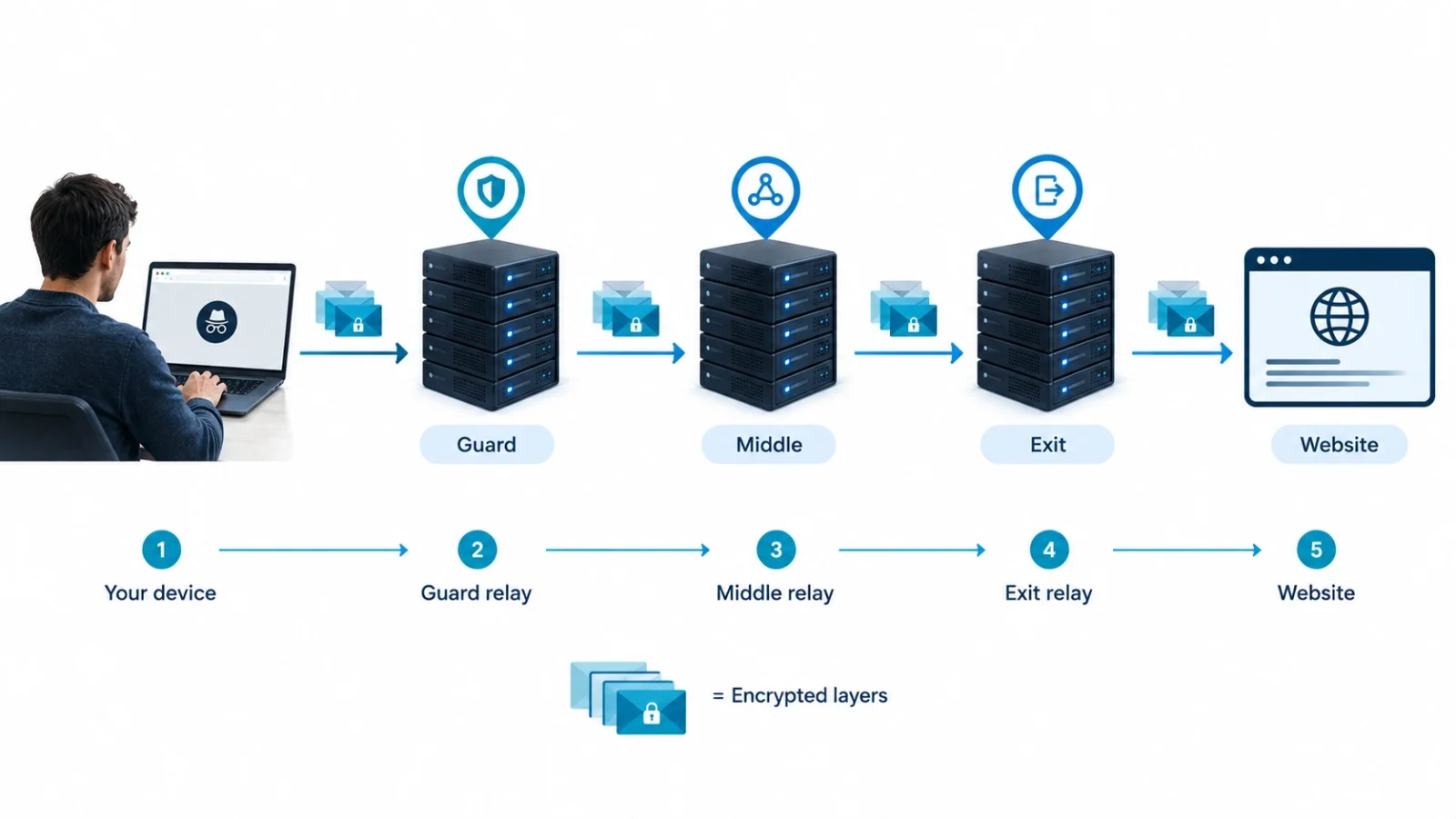
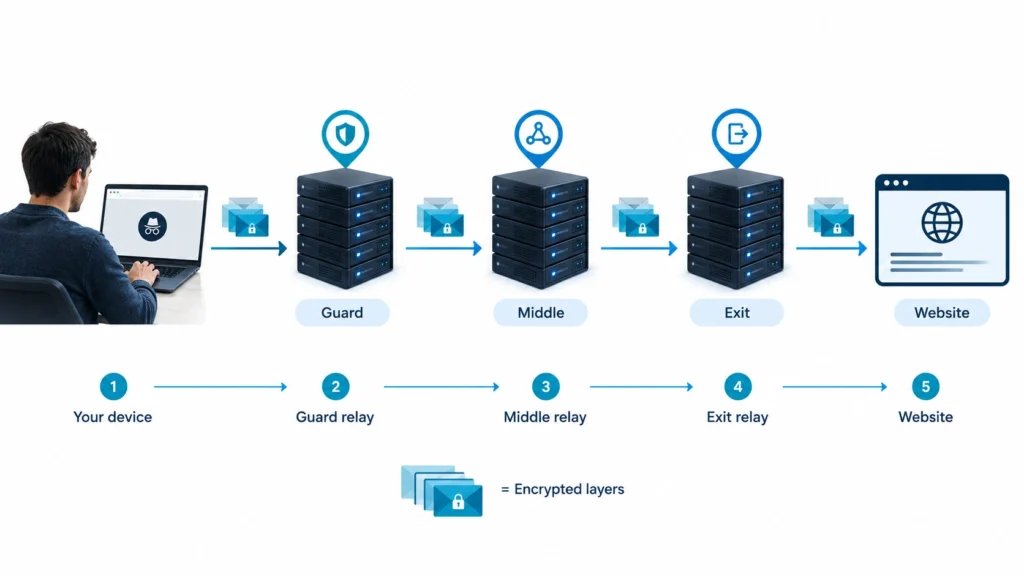
Tor uses a similar idea with three main relays in a typical connection to a normal website: a guard relay, a middle relay, and an exit relay.
- You open Tor Browser. Your browser builds a path through the Tor network.
- The guard relay receives your connection. This is the first relay your device contacts. It can see your IP address, but it does not normally know the final website you are visiting.
- The middle relay passes the traffic along. It connects the first relay to the last relay. It does not normally know your real IP address or the final website.
- The exit relay connects to the website. For a normal website outside Tor, this relay sends the request onward. The website sees the exit relay’s IP address.
- The website sends a response. The response travels back through the Tor circuit to your browser.
This path is called a Tor circuit. Tor chooses the relays and uses encryption between the steps. No single relay is meant to know both who you are and which website you are visiting.
The exact route can change as Tor builds new circuits. Tor also keeps the same first relay, called an entry guard, for a while instead of picking a new one every time. This lowers the chance that your connection lands on a bad first relay.
You can read the technical explanation in the official Tor Project guide to how Tor works.
Onion routing explained simply
Think of a message placed inside three envelopes. Each envelope has instructions for one person. The first person opens the outer envelope and follows its instructions. The next person opens the second envelope. The last person opens the final layer and sends the message to its destination.
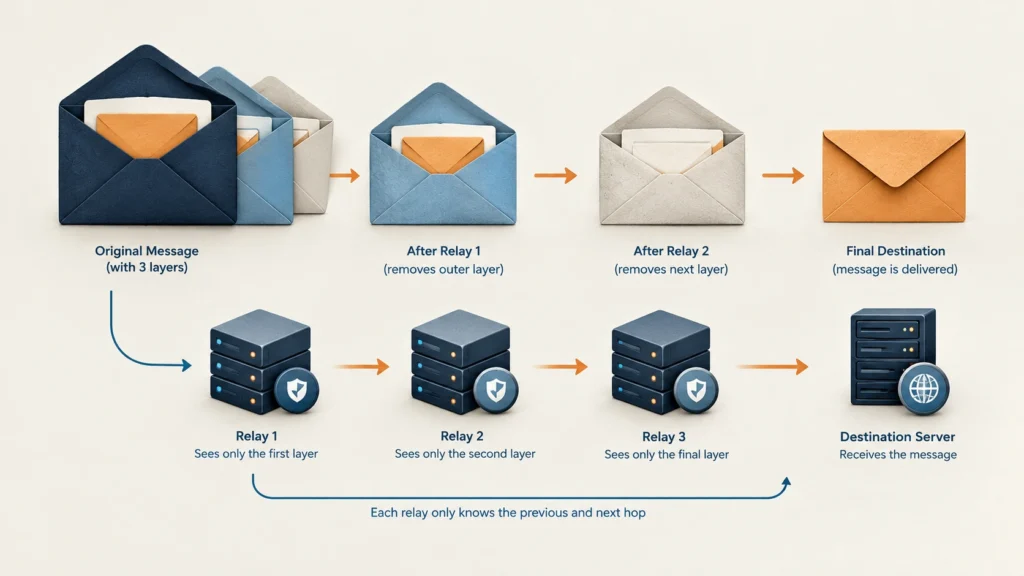
This is a simple way to picture onion routing. In Tor, the data is protected by different layers of encryption. Each relay removes the layer meant for it so it can learn where to send the traffic next.
The guard relay does not simply open every layer and read the whole journey. It handles its part of the circuit. The middle relay handles the next part, and the exit relay handles the last part before traffic reaches a normal website.
This separation is important. One relay should not normally have all the information needed to connect your real IP address with the website you visit.
Still, onion routing does not hide everything. How safe you are also depends on the website, what you do online, and who might be watching.
For another example of privacy tools that work in different ways, read Tor vs VPN: which is better for privacy?
What can each Tor relay see?
The three relays have different jobs. That also means each one can see different parts of the connection.

1. Guard relay: the first stop
The guard relay is the first relay in your circuit. It can see the IP address that connects to it, so it can see the address of your internet connection. It does not normally see the final website you are visiting because the traffic continues through other relays.
Your internet provider may also be able to see that you are connecting to Tor, unless you use a setup that hides or disguises that connection. Tor does not automatically make the use of Tor invisible to everyone watching your network.
2. Middle relay: the link in the chain
The middle relay passes traffic between the guard and the exit. It can see the relay connections on either side, but it does not normally know your real IP address or the final website you want to reach.
Its job is simple: move the traffic along without needing to know the whole story.
3. Exit relay: the last stop
The exit relay sends traffic from Tor to a normal website. The website usually sees the exit relay’s IP address rather than yours.
There is an important detail: if the website uses HTTPS, the connection between the exit relay and the website is encrypted. The exit relay should not be able to read the contents of that HTTPS traffic just because it is the exit relay. If a connection is not encrypted, however, information sent through it may be exposed to the exit relay.
That is why Tor and HTTPS work well together. Tor helps hide the source of your connection from the website, while HTTPS protects the contents of your connection from people who might watch the path.
The Electronic Frontier Foundation has a useful visual guide to how Tor and HTTPS work together.
Why is Tor slower than normal browsing?
Tor can be slower because your traffic takes a longer route. Instead of going directly from your device to a website, it travels through several relays that may be in different countries.
Each relay needs time to receive and pass along traffic. The relays also have different internet speeds and may be busy helping many users at once. These extra steps can make pages load more slowly, videos buffer, or some websites fail to work as expected.
The speed depends on the circuit, the website, the network, and the kind of content you are loading. Some pages may feel fine, while large downloads or live video may feel much slower.
Tor is designed to improve privacy, not to make your internet connection faster. If you need the fastest possible connection for gaming or large downloads, Tor may not be the best choice.
What Tor cannot hide
Tor can improve privacy, but it does not make you completely anonymous in every situation. Your own actions and the security of your device still matter.
Logging in can reveal who you are
If you sign in to your personal email, social media, or shopping account, that service can connect your activity to that account. Tor may hide your home IP address from the service, but it cannot stop you from telling the service who you are. It is also smart to use a different, strong password for every account. If one password leaks, criminals may try it on many other sites. This trick is called credential stuffing.
Malware can still cause harm
Tor does not make harmful files safe. If you download a file that contains malware and open it, your device may be at risk. Some documents can also connect to the internet outside the browser and reveal information about your connection.
Extra browser add-ons can weaken privacy
Tor Browser is set up with privacy protections already in place. Adding extra extensions or changing important settings can make your browser easier to identify or can weaken those protections. Use the official browser and avoid add-ons you do not need.
Someone watching both ends may learn from traffic patterns
A very powerful watcher who can see traffic going into and coming out of the Tor network may compare when data moves and how much of it moves. This is known as traffic correlation. Tor reduces many privacy risks, but it cannot promise protection from every possible attacker.
For more on what websites can learn from your browser, see our guide to what information your browser shares. You can also read the Tor Project’s browser security guidance.
How to use Tor more safely
If you want to use Tor for everyday privacy, follow these basic steps:
- Download Tor Browser from the official site. Use torproject.org/download, not a random download page.
- Keep it updated. Updates can fix security problems and improve protection.
- Do not add unnecessary extensions. Extra add-ons may make your browser easier to identify.
- Be careful with downloaded files. Do not open unknown files just because you downloaded them while using Tor.
- Think before logging in. A personal account can reveal your identity to that service.
- Use HTTPS websites. Look for HTTPS when sending private information to normal websites.
For the official beginner guide, read the Tor Project’s Tor Browser help pages. The Electronic Frontier Foundation also explains how to protect yourself online in simple steps.
Common questions about how Tor works
Does Tor hide my IP address?
When you visit a normal website through Tor Browser, the website usually sees the exit relay’s IP address instead of your public IP address. Your internet provider may still see that you are connecting to Tor.
Is Tor completely anonymous?
No tool can promise complete anonymity in every situation. Tor helps separate your identity from the websites you visit, but logging in, sharing personal details, malware, or a powerful observer watching both ends may put your privacy at risk.
Can an exit relay read my passwords?
If you use a properly secured HTTPS website, the exit relay should not be able to read the contents of your connection. If a site uses an unencrypted connection, information sent through it may be exposed. Always use HTTPS for accounts and private information.
Is Tor the same as a VPN?
No. Tor sends traffic through a series of relays, while a VPN normally sends it through a connection managed by one VPN provider. Each has different benefits and limits. Read our guide to Tor vs VPN for a fuller comparison.
Can Tor open onion websites?
Yes. Tor Browser can open websites with modern addresses ending in .onion. These sites use Tor’s network in a different way from normal websites. Learn more in our guide to how onion addresses work.
Trusted sources and further reading
This guide uses information from the Tor Project and the Electronic Frontier Foundation. Read the original resources below to learn more about the technology and its limits.
- Tor Project: How Tor works
- Tor Project: Entry guards
- Tor Project: Encryption keys
- Tor Project: Types of relays
- Electronic Frontier Foundation: Tor and HTTPS
- Electronic Frontier Foundation: Surveillance Self-Defense
- DeepHiDX: Dark web glossary
- DeepHiDX: Sources and research
The short version
So, how does Tor work? It sends your web traffic through a guard relay, a middle relay, and an exit relay. Layers of encryption help each relay handle its part without seeing the whole path.
The website usually sees the exit relay’s IP address, not your home IP address. But Tor is not magic. Logging in, opening unsafe files, or using a website without HTTPS can still put your privacy at risk.
Use the official Tor Browser, keep it updated, and remember what Tor can and cannot protect. Understanding its limits is just as important as knowing how it works.



Comments