


By Ehtijad Ali
Updated: October 2026
Reading time: about 8 minutes

Someone sends you a friend request. Their profile photo looks real. They have a few friends, some posts, and a name you recognize. Should you accept?
Not so fast. Some fake social media accounts look real at first. A person may use stolen photos, copy another user’s name, or create a profile just to trick people into sending money or sharing private information.
The good news is that you can learn how to spot a fake social media account with a few simple checks. You do not need special software or advanced computer skills. You just need to look at the details and avoid rushing.
In this guide, you will learn how to check profile photos, usernames, posts, followers, and messages. You will also learn how to check a profile picture with a free image search tool and what to do when you are not sure.
Remember: One warning sign does not prove that an account is fake. Look for several clues before making a decision.
Table of Contents
How to spot a fake social media account: a quick 7-sign checklist
- The account was created recently and has little history.
- The username contains odd letters, numbers, or extra symbols.
- The profile photo appears on other people’s accounts or unrelated websites.
- The posts are copied, repeated, or shared in a strange pattern.
- The followers or friends look unusual or do not match the profile.
- The account sends strange links or asks for money or private details.
- The person claims to be someone you know but cannot confirm their identity.
These signs can help you decide when to look more closely. They are not proof on their own. Some real users have new accounts, few friends, or unusual usernames.
Why do people create fake social media accounts?
Fake accounts are made for different reasons. Some copy real people to fool their friends. Others try to sell fake products, spread false stories, collect personal details, or send harmful links.
A scammer may pretend to be a friend who needs money. Another may copy a business page and ask customers to pay through a private message. Some fake profiles also try to gain trust before asking for help or money.
Meta explains that scammers may pretend to be people or groups you know to trick you into sharing money or personal information. Read its official scam safety guide to learn more.
Many fake accounts start the trick with a message. Our guide on how to tell if a message is a scam explains the warning signs in simple words.
1. Check the profile photo, name, and username
The first step in learning how to spot a fake social media account is to check the basic details. Open the profile and look at the photo, display name, username, and bio. Do they fit together, or do some details seem strange?
Look for a copied profile photo
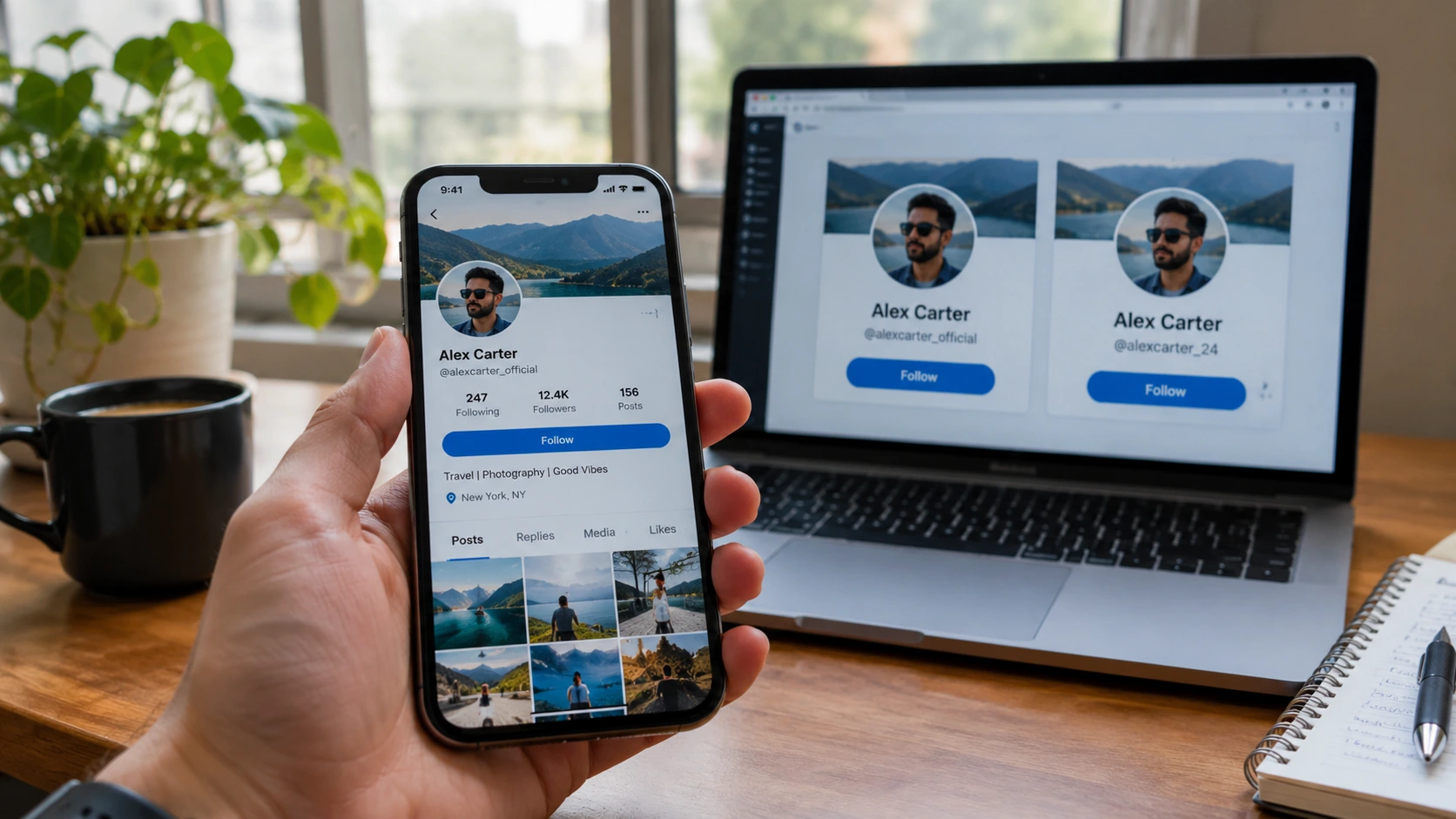
A fake account may use a photo taken from another person’s profile, a public website, or a photo collection. The person in the picture may have nothing to do with the account.
Be careful if the same photo appears under different names or if the account claims to belong to a business but uses an unrelated person’s picture. However, many real users use photos found online, so check for other signs too.
Look closely at the username
A copied account may use a username that looks almost like the real person’s name. It might add extra numbers, dots, underscores, or a small spelling change.
For example, a fake account may use a username that looks very close to a friend’s real username. Do not judge by the name alone. Compare the full username with the one on the person’s known profile.
Check when the account became active
A new profile with no history deserves a closer look, especially if it claims to belong to a well-known person or company. But a new account is not automatically fake. People join social media every day. Scammers can also use voice clips from public videos to fake a family emergency call. Here is how to spot an AI voice cloning scam.
Look for a mix of clues. Does the account have a believable history? Do its details match information you can confirm elsewhere? Is it asking you to do something risky?
2. Use reverse image search to check a profile picture

One useful way to check if a social media profile picture is stolen is to search for the same image online. This is called reverse image search. It helps you find websites or other pages where a similar image appears.
Here is how to try it:
- Open the profile and save its public profile picture only if you can do so safely and lawfully.
- Visit Google Images.
- Choose the image search option and upload the picture, or use Google Lens to search an image you can access.
- Look for matching pictures on other profiles, websites, or older posts.
- Check the pages where the image appears and compare the names and dates.
You can follow Google’s instructions in its official guide to searching with an image.
For more detailed research tips, read Bellingcat’s guide to reverse image search. It explains how image searches can help people find earlier uses of a picture.
What if you find the same photo somewhere else? Check the context. If a profile claims the photo belongs to one person but an older public page identifies it as someone else, that is a reason to investigate further. It is not final proof by itself. Photos can be shared with permission, and search results can be incomplete or wrong.
Also, a search that finds no matches does not prove the photo is real. The image may be new, private, edited, or missing from search results.
3. Look at the account’s posts and activity
Posts can tell you more about an account than its profile photo. Look at several posts instead of judging by one picture or message.
- Repeated posts: The same message or link appears again and again.
- Strange timing: Many similar posts appear within a short time.
- Copied content: Posts appear to be taken from other pages without clear credit.
- Unrelated topics: The account jumps between topics or promotions that do not seem connected.
- Sudden changes: An account that once shared normal updates suddenly starts posting suspicious links.
These patterns may suggest that an account is automated or being used to spread spam. An automated account is often called a bot. Some bots are useful, and some real people post frequently or share the same content.
Do not call an account fake just because it posts a lot. Look at what it shares, how it behaves, and whether other details support your concern.
4. Check followers, friends, and comments
The people connected to an account can provide useful clues. You do not need to inspect every follower. Look for patterns that seem unusual for the account.
- The account claims to be a local business, but its public activity seems unrelated to that business.
- Many comments are repeated phrases or look like generic praise.
- The profile has many followers but very little real conversation.
- Several connected accounts use similar names, photos, or copied posts.
- The account follows many people but has little public history of its own.
Remember that follower counts can be bought, hidden, or changed. Some genuine people have few friends, while popular accounts may have thousands of followers and little direct conversation.
Use these details as clues, not as a final answer. Compare them with the account’s claims and other information you can check.
5. Watch for strange messages and urgent requests
Sometimes the biggest warning sign is not the profile. It is the message the account sends you.
- It asks for money, gift cards, or cryptocurrency.
- It asks for your password, login code, or bank details.
- It sends a link and tells you to act right away.
- It claims you have won a prize you never entered to win.
- It pretends to be your friend but says not to contact anyone else.
- It offers a deal that seems far too good to be true.
If a person you know suddenly asks for money, contact them using a phone number or another account you already trust. Do not use the contact details sent by the suspicious profile.
Never share a login code just because someone says they need it to help you. If a message makes you feel afraid or rushed, stop and check it first.
For more advice, read the Meta scam prevention guide and our related guide on email data breaches.
6. Confirm the person’s identity in a safe way
If an account claims to be your friend, family member, public figure, or a business, try to confirm the claim using a separate trusted source.
- Ask your friend directly through a phone number you already have.
- Visit the business’s official website and use the contact details listed there.
- Compare the account with links shared on the person’s known official page.
- Check whether the claimed name, role, and public information match.
- Look for a platform verification badge, but remember that badges and platform rules can differ.
Do not trust an account only because it has a familiar photo, a large audience, or a verification symbol. Check what the badge means on that platform and whether the account’s behavior makes sense.
You can also learn the basics of social media verification from Bellingcat. Its guide explains why checking the source and context of online content matters.
7. Use simple OSINT checks, but protect privacy
OSINT means open-source intelligence. In simple words, it means learning from information that is already publicly available. It can include public posts, websites, image searches, and official pages.
You can start with ordinary search tools. Search the exact username, check public posts, and compare information with trusted sources. Do not try to break into an account or access private information.
Want to try more free checks? Our beginner list of free OSINT tools for beginners shows simple tools for checking public information step by step. If a fake profile is sharing a photo that seems too shocking to be true, our guide on how to verify a viral photo shows you how to check where a picture really came from.
For simple definitions of words like OSINT and bot, visit our dark web glossary. It explains online terms in plain English.
Why one warning sign is not proof
It is easy to get the wrong idea when checking a profile. A new account may belong to a real person. A person may use the same photo on several websites. Someone may have very few friends because they are new to the platform.
Even a reverse image search may fail to find the original photo. That does not mean the photo is fake.
A better approach is to collect several clues. Check the username, photo, posts, connections, and messages. Then try to confirm the account’s identity using a separate source.
If you cannot confirm the answer, it is fine to say “unclear”. You do not have to label someone a scammer just because something seems unusual.
Being careful also means respecting privacy. Do not publish someone’s personal details, accuse them in public without evidence, or use fake accounts to test them.
What should you do if you find a fake account?
If you believe an account is fake or is pretending to be someone else, take these steps:
- Do not send money, passwords, login codes, or private information.
- Save relevant messages or screenshots if you may need to report the account.
- Use the platform’s built-in tools to report impersonation, fraud, or spam.
- Block the account if it keeps contacting or bothering you.
- If you shared a password, change it on the affected account and anywhere else you reused it.
- If money was stolen, contact your bank or payment service as soon as possible.
If the profile pretends to be someone you know, tell that person through a trusted contact method. They may need to warn other people or report the copied account.
Frequently asked questions
How can I tell if a social media account is fake?
The easiest way to spot a fake social media account is to check the username, profile photo, account history, posts, followers, and messages. Look for several warning signs and try to confirm the person’s identity using a separate trusted source.
How can I check if a profile picture is stolen?
Use Google Images or Google Lens to search for the picture. Compare any matching results with the account’s claims. A match can be a useful clue, but it does not prove fraud by itself.
Are all new social media accounts fake?
No. Real people create new accounts all the time. Check the account’s behavior and other details instead of judging by its age alone.
Can a fake account have real followers?
Yes. A fake account may gain real followers, buy followers, or copy a genuine profile. A large follower count does not prove that the account is trustworthy.
What should I do if someone copies my profile?
Report the copied profile through the platform’s official reporting process. Save useful evidence, warn your contacts through a trusted channel, and never pay someone who claims they can remove the fake account for a fee.
Can I know for sure if an account is fake?
Not always. Public information may be incomplete, and some accounts are hard to verify. If you cannot find enough reliable evidence, treat the account as unconfirmed and avoid sharing sensitive information.
Helpful links and trusted sources
Use these resources to learn more about checking online profiles, images, and suspicious messages.
- Bellingcat: A Beginner’s Guide to Social Media Verification
- Bellingcat: Guide to Reverse Image Search
- Google: Search with an image
- Meta: Scam prevention and online safety
- DeepHiDX: 9 Free OSINT Tools for Beginners
- DeepHiDX: How to Verify a Viral Photo in 5 Minutes
- DeepHiDX: How to Tell If a Message Is a Scam
- DeepHiDX: Dark Web Glossary
- DeepHiDX: Sources and Research
- DeepHiDX: How to Check If Your Email Was in a Data Breach
The short version
Learning how to spot a fake social media account starts with checking the small details. Look at the photo, username, posts, followers, and messages. Search the profile picture if needed, and confirm important claims through a trusted source.
Most importantly, do not rush into trusting a stranger or sending money. One clue is not proof, and it is okay to say you are unsure. When in doubt, protect your information and use the platform’s official tools to report suspicious behavior.



Comments