


By Ehtijad Ali
Updated: September 2026
Reading time: about 10 minutes

You probably use one email address for a lot of things. Games. Shopping. School. Social media. Maybe even your bank.
Now think about this: what if one of those websites gets hacked?
If that happens, your email address can be taken by the hackers. That is called a data breach.
Here is the good news. You can check if your email was in a data breach. It is free, it is safe, and it takes about one minute.
This guide shows you how to check if your email was in a data breach, what your answer really means, and what to do next. Everything is explained in simple words.
What is in this guide (jump to any part)
- What is a data breach?
- Why should you care?
- How to check if your email was in a data breach (about 1 minute)
- What your results mean
- What to do next: 5 steps
- How to make a password that is hard to crack
- Watch out for fake “you were hacked” emails
- Get a warning next time (before you hear it on the news)
- Your simple safety checklist
- Questions people ask
- Helpful links
- The short version
What is a data breach?
A data breach is when someone steals private information from a website or a company.
Think of a website like a big room full of lockers. Your locker holds your name, your email, and your password. A data breach is when a thief breaks into that room and empties out thousands of lockers at once.
The thief does not know you. They are not picking on you. They just grab everything.
After that, the stolen list often gets posted or sold online, sometimes on the dark web. Then other people can use it too. If a word in this guide is new to you, our dark web glossary explains these terms in plain English. Today, a lot of stolen data is also traded in Telegram groups, not only on dark web sites, and some of the biggest leaks come from ransomware gangs that steal company data and publish it.
Why should you care?
Lots of people use the same password on many websites. That is the real danger.
If a thief steals your password from one website, the next thing they do is try that same password on your email, your bank, and your social media. Sometimes it works.
Computer experts call this trick “credential stuffing.” That is just a fancy way of saying: try the stolen password everywhere and see what opens. That is why it is worth two minutes to check if your email was in a data breach today. Big leaks happen more often than most people think – you can see how often on our dark web timeline.
How to check if your email was in a data breach (about 1 minute)
The easiest way to check if your email was in a data breach is a free website called Have I Been Pwned. It is run by a well-known security expert, and it has been helping people since 2013.
- Open haveibeenpwned.com in your browser.
- Type your email address in the big box.
- Click the button that says pwned? (“pwned” is internet slang for “got beaten.”)
- Wait about one second. Your answer shows up right away.
Green screen? Great news. Your email was not found in any breach the website knows about.
Red screen that says “Oh no – pwned!”? Your email was found in at least one breach. Do not panic. Just keep reading.
Safety note: This website never asks for your password. If any website asks you to type your real password to “check” it, close that page. (Have I Been Pwned does have a separate password checking page, and it is built so the site never sees your full password.)
What your results mean
When you check if your email was in a data breach and your address is found, scroll down the page. You will see a card for each breach. Each card tells you three things:
- The name – which website or app got hacked.
- The date – when the hack happened.
- What was taken – for example: emails, passwords, names, phone numbers, or home addresses.
Read the “what was taken” part carefully. That is the part that tells you how worried to be.
If only your email address was taken, you will probably just get more spam. If your password was taken, that is more serious. Change it today.
One more thing, and it is important: being on the list does not mean someone is inside your account right now. It only means your information was part of a hack somewhere. Now is the moment to lock your doors.
What to do next: 5 steps
So you went to check if your email was in a data breach, and the answer came back yes. Do not panic. Work through these five steps in order and you will be safer within ten minutes.
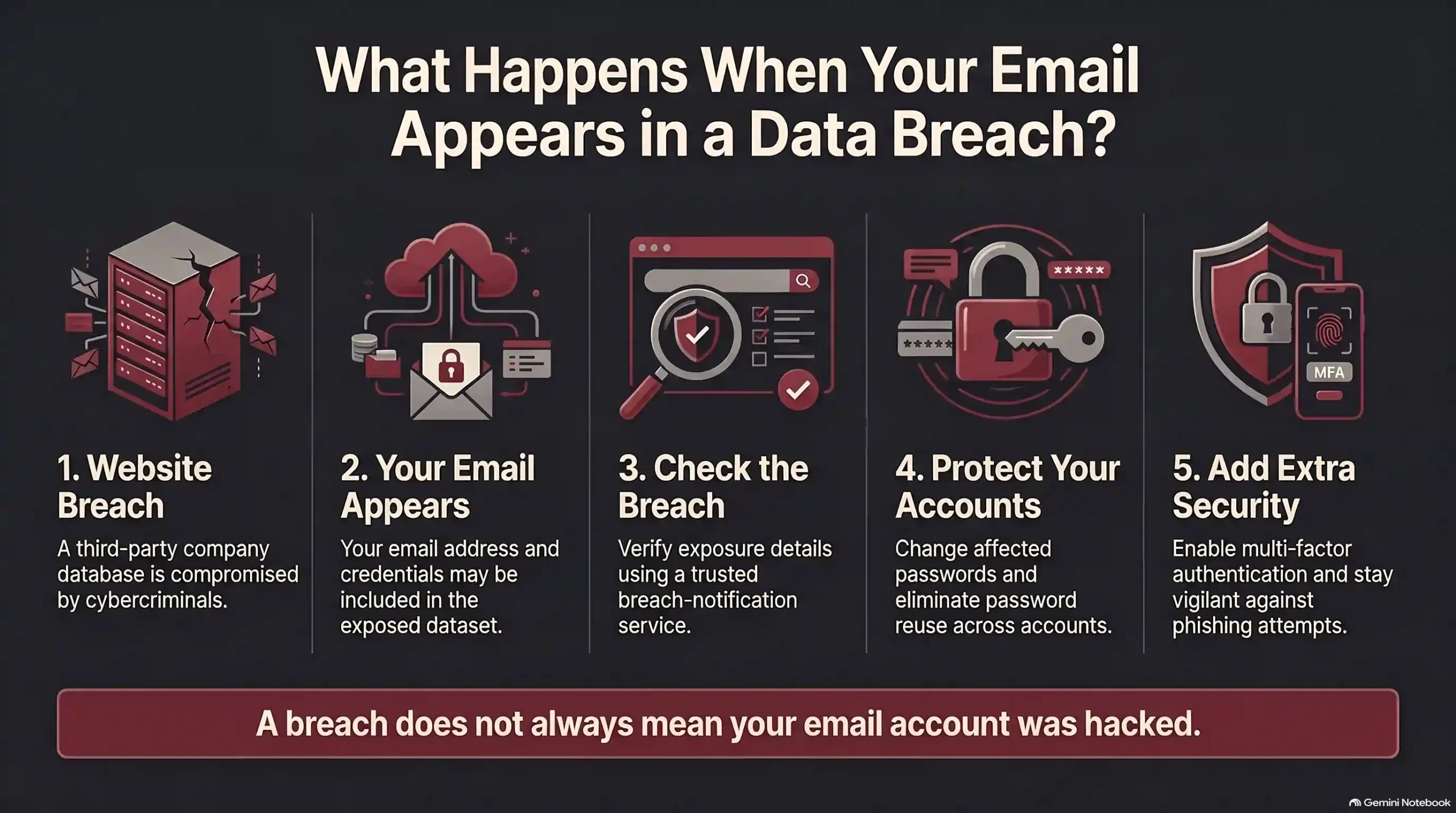
Step 1: Change the password on the hacked site
Start with the website that was breached. Log in and pick a brand new password. Do not just add a “1” to the end of the old one. Make it truly different.
Step 2: Change it everywhere else you used it
This step is the one people skip, and it is the most important one. If you used that same password on five other sites, change it on all five. A stolen password is only dangerous if it still works somewhere.
Step 3: Turn on two-step login
Two-step login (you may also see it called 2FA) means a password alone is not enough to get in. After the password, the site sends a short code to your phone or app. You type the code, and only then are you in. Text message codes can be stolen with a SIM swap scam, so an authenticator app is safer when you can use one.
It is like needing a key and a secret knock. Even if a thief has your password, they are stuck at the door. The FTC explains it here: Use Two-Factor Authentication to Protect Your Accounts.
Step 4: Protect your email account first
Your email is the master key. If someone gets into it, they can click “forgot password” on all your other accounts and take them one by one.
So give your email the strongest password you have, and turn on two-step login there before anywhere else.
Step 5: Watch your accounts for a few weeks
It is also worth coming back in a few weeks to check if your email was in a data breach again. In the meantime, look out for login alerts you did not cause, password reset emails you did not ask for, or money missing from a bank or shopping account. If you see any of these, change that password again and tell the company right away.
How to make a password that is hard to crack
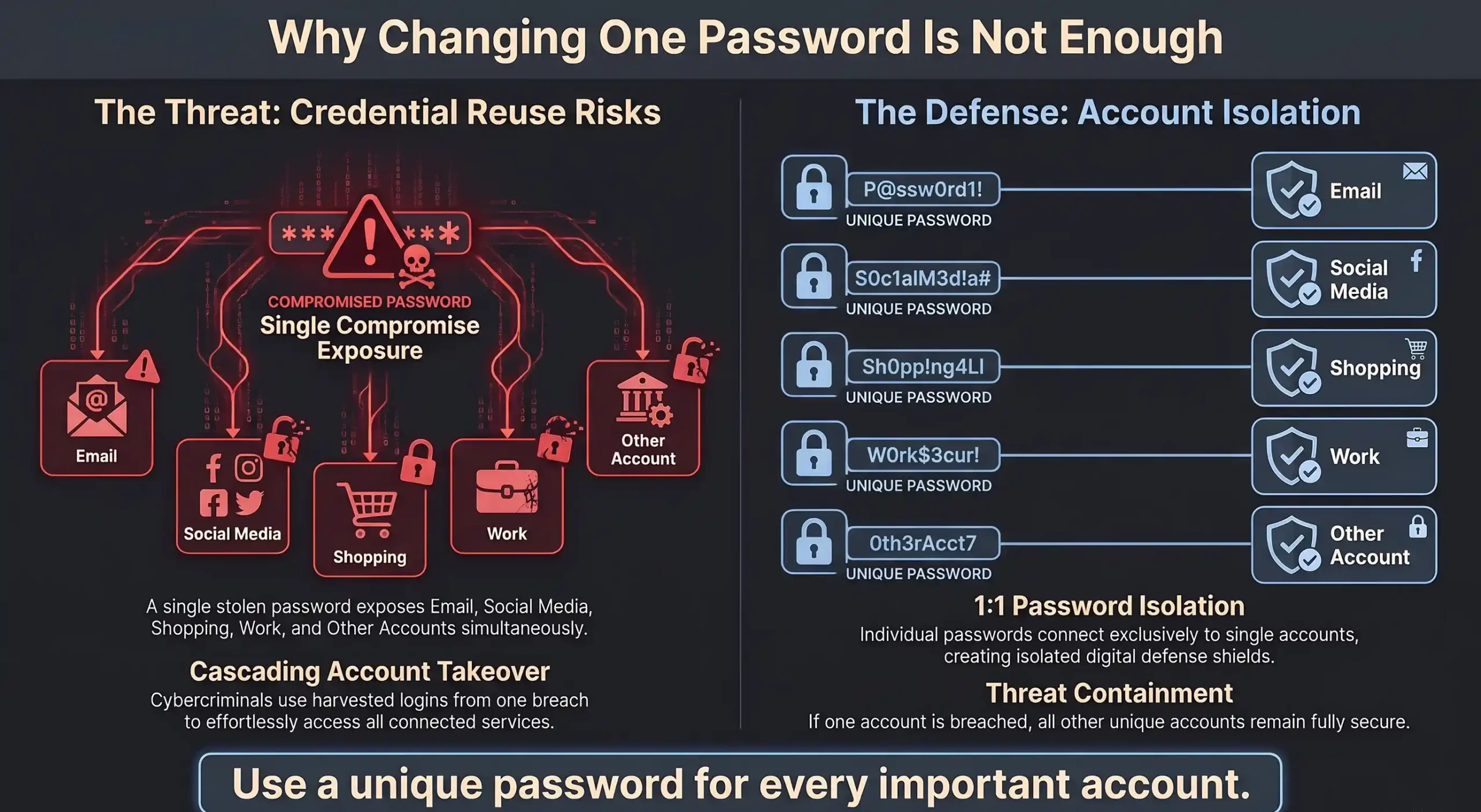
A good password is long and not used anywhere else. That is really the whole secret.
- Go long. Aim for at least 12 characters. Longer is better.
- Try three random words. Something like copper-otter-lantern is easy for you to remember and very hard for a computer to guess.
- Never reuse it. Each important account gets its own password.
- Skip the obvious stuff. No birthdays, pet names, “password123,” or your favorite team.
Want more tips from an official source? Read Creating Strong Passwords and Other Ways to Protect Your Accounts from the U.S. Federal Trade Commission.
Cannot remember them all? Use a password manager
A password manager is an app that remembers your passwords for you. It can also make new strong ones with one click. You only have to remember one main password.
The UK National Cyber Security Centre has a clear, friendly explanation here: Password managers – NCSC.
Watch out for fake “you were hacked” emails
Here is a trick that scammers love. Right after a big breach is in the news, they send emails that look like real warnings.
The email might say “Your account was breached! Click here to secure it.” The link goes to a fake login page. You type your password, and now they really do have it.
Keep these rules in mind:
- Do not click links in a scary email you were not expecting.
- Instead, open a new tab and type the website address yourself.
- Real companies do not ask for your password by email. Ever.
- If an email is rushing you or scaring you, slow down. That pressure is the trick. Go and check if your email was in a data breach yourself, on the real website.
The FTC has good examples of what these messages look like: How To Recognize and Avoid Phishing Scams.
Get a warning next time (before you hear it on the news)
You do not have to check if your email was in a data breach by hand every month. Have I Been Pwned can email you if your address ever shows up in a new breach.
Sign up on the Notify Me page. It is free. You put in your email once, confirm it, and then the site watches for you.
Your simple safety checklist
- Check if your email was in a data breach at Have I Been Pwned today.
- Change any password that was part of a breach.
- Stop reusing the same password on different sites.
- Turn on two-step login for your email, bank, and social media.
- Sign up for breach alerts on the Notify Me page.
- Never click a password link in an email you did not expect.
Questions people ask
Is it safe to type my email into that website?
Yes. It is safe to check if your email was in a data breach there. The site only looks your address up in a list of known breaches. It does not ask for your password, and it does not sell your address. You can read how it works in the Have I Been Pwned FAQ.
My email was found. Was I hacked?
Not necessarily. When you check if your email was in a data breach and it comes back found, it means a website you used was hacked and your information was in the pile. Your account may still be fine. Changing the password makes sure it stays that way.
Which websites have been breached?
You can browse the full list at the Have I Been Pwned breach database. It has hundreds of sites, including some very big names.
How often should you check if your email was in a data breach?
Checking a few times a year is plenty. It is smart to check if your email was in a data breach again after you hear about a big hack in the news, and the free alerts below will tell you the rest of the time.
What if my old password is in the breach but I already changed it?
Then you are in good shape. Just make sure that old password is not still in use on any other site.
Helpful links
These are the tools and official guides used in this article. You can see how we pick and verify what we publish on our sources and research page.
- Have I Been Pwned – check if your email was in a data breach, free
- Notify Me – get an alert about future breaches
- Pwned Passwords – check if a password has been leaked
- Breach database – the full list of hacked websites
- Have I Been Pwned FAQ – how the service works
- FTC: Creating strong passwords
- FTC: Two-factor authentication
- FTC: How to recognize phishing scams
- NCSC: Password managers
The short version
Check if your email was in a data breach. Change any password that leaked. Stop using the same password twice. Turn on two-step login. Ignore scary emails that rush you.
Five minutes today can save you a very bad week later.


Comments