
By Ehtijad Ali
Updated: October 2026
Reading time: about 11 minutes
You find a shop online with amazing prices. Or you get a link from someone you do not know. Before you buy anything or type in your details, a smart question pops into your head: who owns this website?
The good news is that you can find out a lot for free in just a few minutes. You do not need to be a hacker or a detective. You only need the website address and a few simple tools.
This guide shows you, step by step, how to find out who owns a website, why the owner’s name is often hidden, what other clues you can check, and what to do if a site looks fake.
What is in this guide?
Who owns this website? The short answer
- Use a free domain lookup, like ICANN Lookup. Type in the website address.
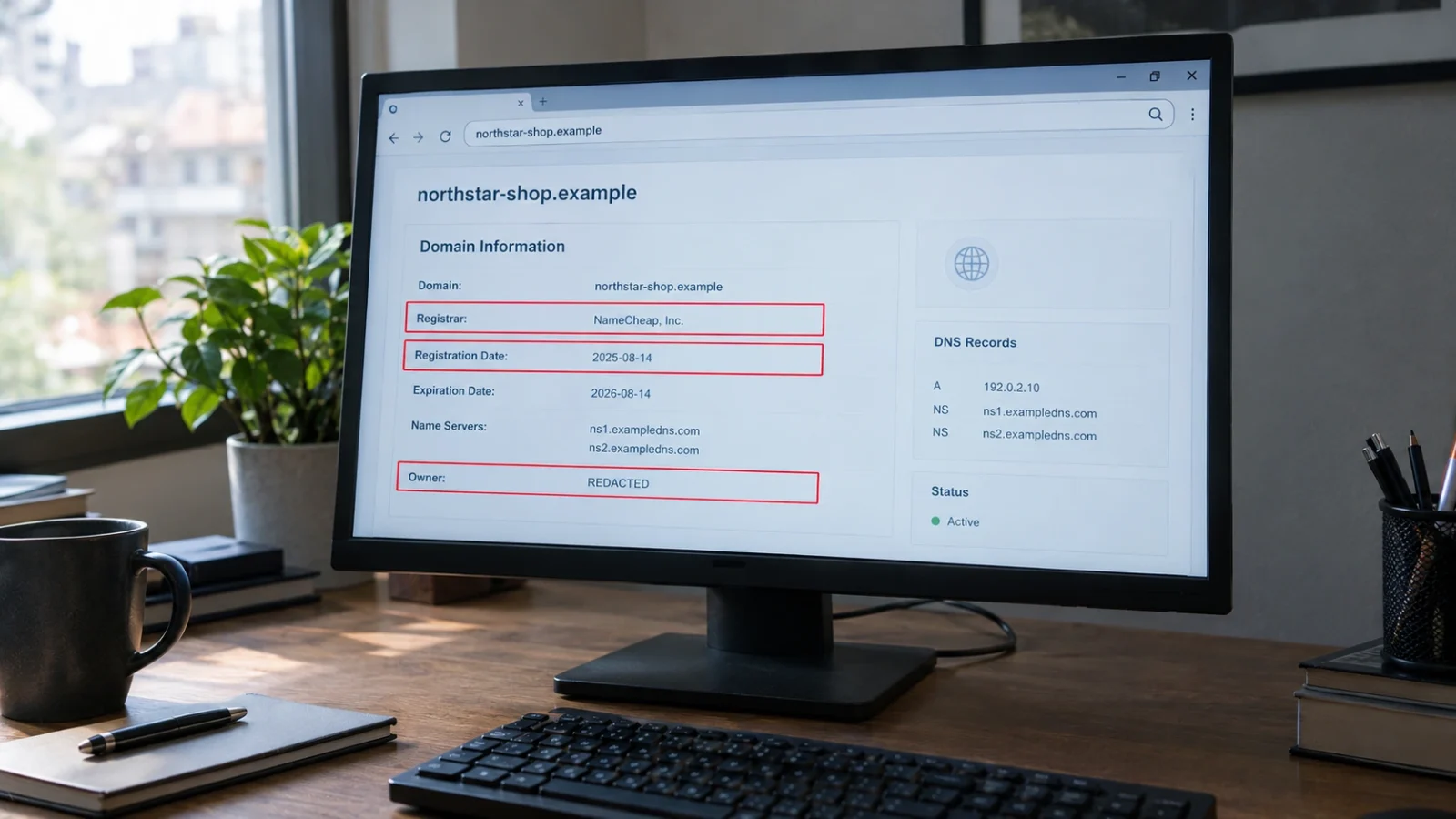
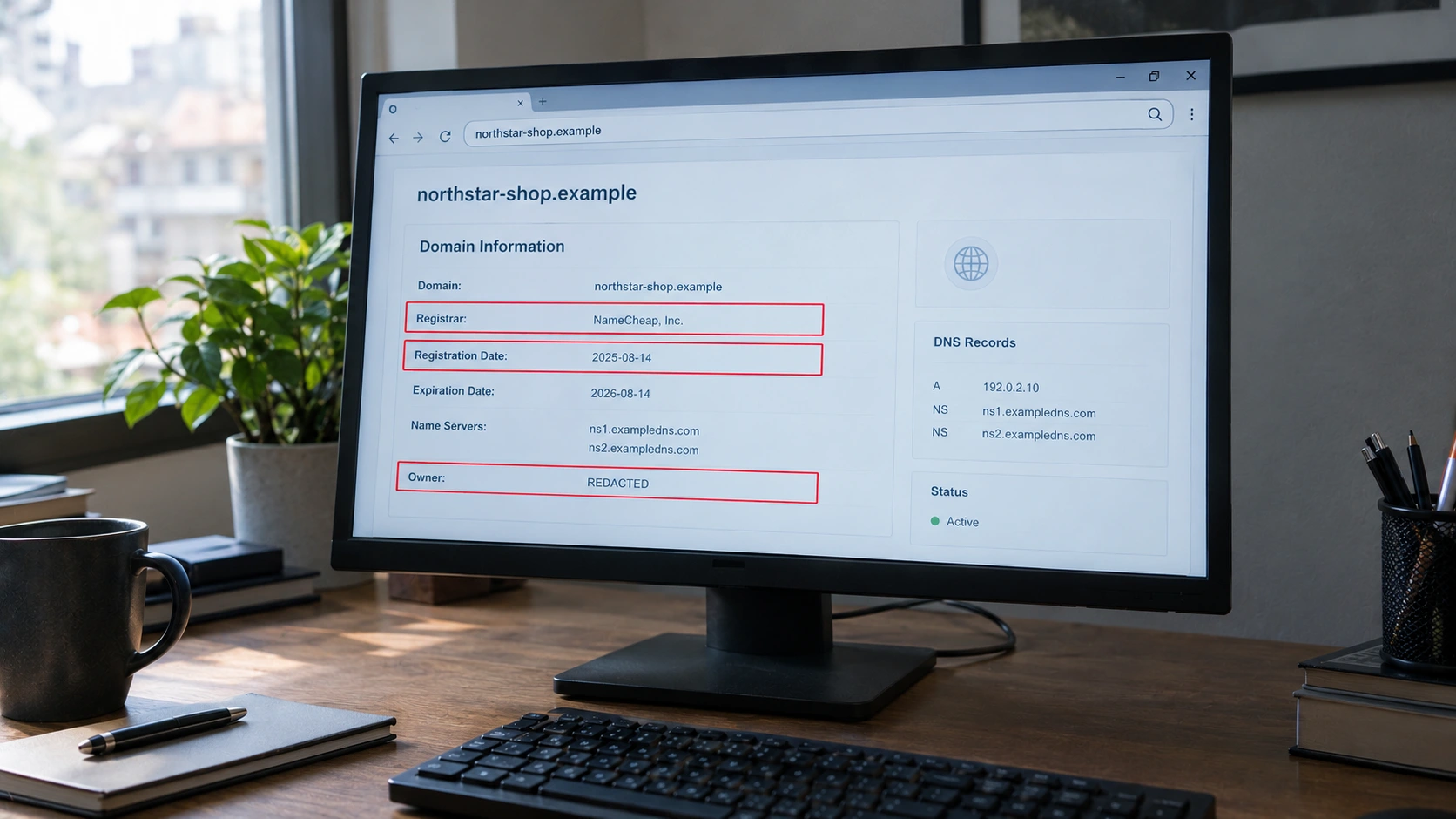
- You will usually see the registrar (the company that sold the domain), the date it was created and when it expires.
- The owner’s name is often hidden (“REDACTED”) to protect privacy. That is normal.
- Check other clues: the About and Contact pages, old versions of the site and reviews.
- If the site looks fake, report it and do not buy anything.
Why find out who owns a website?
Asking “who owns this website?” is a smart safety habit. Here are some good reasons to check:
- Shopping safety. Make sure an online shop is real before you pay.
- Avoiding scams. Fake banks, fake delivery pages and fake giveaways often use brand-new websites.
- Checking news and facts. Know who is behind an article or claim.
- Reporting problems. Find the right company to contact about abuse or copied content.
- Buying a domain name. See if a name you want is taken and when it expires.
Checking who owns a site is one part of a bigger skill. Our guide on how to tell if a website is fake shows five more quick checks before you buy.
What are WHOIS and RDAP?
Every website name, like example.com, is called a domain. When someone buys a domain, they give their details to a company called a registrar. Those details are saved in a public record.
What is WHOIS?
WHOIS is the old system people used to look up those records. The name is easy to remember: it asks “who is” behind a domain. For many years, a WHOIS search could show the owner’s name, email, phone number and address.
What is RDAP?
RDAP stands for Registration Data Access Protocol. It is the newer, safer system that replaced WHOIS for most popular website endings, like .com, .org and .net. Since January 28, 2025, ICANN says RDAP is the official source for this kind of domain information.
Think of it like a library card catalog that got upgraded to a computer. The information is similar, but RDAP is faster, works in more languages and can protect private details better. You can read more on ICANN’s RDAP page.
How to find out who owns a website: 5 easy ways
Here are five free ways to answer “who owns this website?” Start with step 1, then use the others to fill in the gaps.
1. Do a free domain lookup
- Go to ICANN Lookup.
- Type the website name only, like northstar-shop.example. Do not include “https://” or extra pages.
- Press Lookup.
- Read the results.
Here is what the main parts mean:
- Registrar: the company that sold the domain, like a store that sells website names.
- Created or registration date: when the domain was first bought. A very new date can be a warning sign for a shop that claims to be “trusted since 2010”.
- Expiration date: when the domain needs to be renewed.
- Name servers: the computers that point the domain to its website. They often show which hosting or security company the site uses.
- Registrant: the owner. This is often hidden.
2. Read the About and Contact pages
Real businesses usually explain who they are. Look for a company name, a real street address, a phone number and an email that matches the website name. Copy the company name into a search engine to see if it really exists.
3. Check older versions of the website
The Wayback Machine from the Internet Archive saves copies of websites over time. Type in the address to see what the site looked like in the past. If a “10-year-old shop” did not exist last month, that is a big clue.
4. Look at the registrar and hosting clues
Even when the owner is hidden, the registrar and name servers can tell you where to send a complaint. They also help investigators connect several fake sites run by the same group. Our list of free OSINT tools for beginners shows simple tools that can help.
5. Compare reviews and public records
Search for the website name plus words like “reviews”, “scam” or “complaints”. Check whether the business appears on official company registers in its country. If nobody online has ever heard of it, be careful.
Can you check who owns this website on your phone?
Yes. ICANN Lookup works in any phone browser. Open the site, type the domain name and tap Lookup. The Wayback Machine also works on phones. So you can check a shop before you buy, even while you are on the go.
Who owns this website vs who hosts it: what is the difference?
These two things sound the same, but they are not. Think of a website like a shop in a shopping mall:
- The domain owner is like the shop owner. They chose the name and control the website.
- The registrar is like the office that rented them the shop sign with the name on it.
- The hosting company is like the mall building. It stores the website’s files on its computers.
So when you ask “who owns this website?”, the lookup may show you the registrar, and the name servers may point to the hosting company. Neither one is the owner. But both can take action if the site breaks the rules, which is why they matter when you report a scam.
For example, a lookup might show “NameCheap, Inc.” as the registrar. That does not mean NameCheap runs the website. It only means the domain was bought through them.
Why are website owner details hidden?
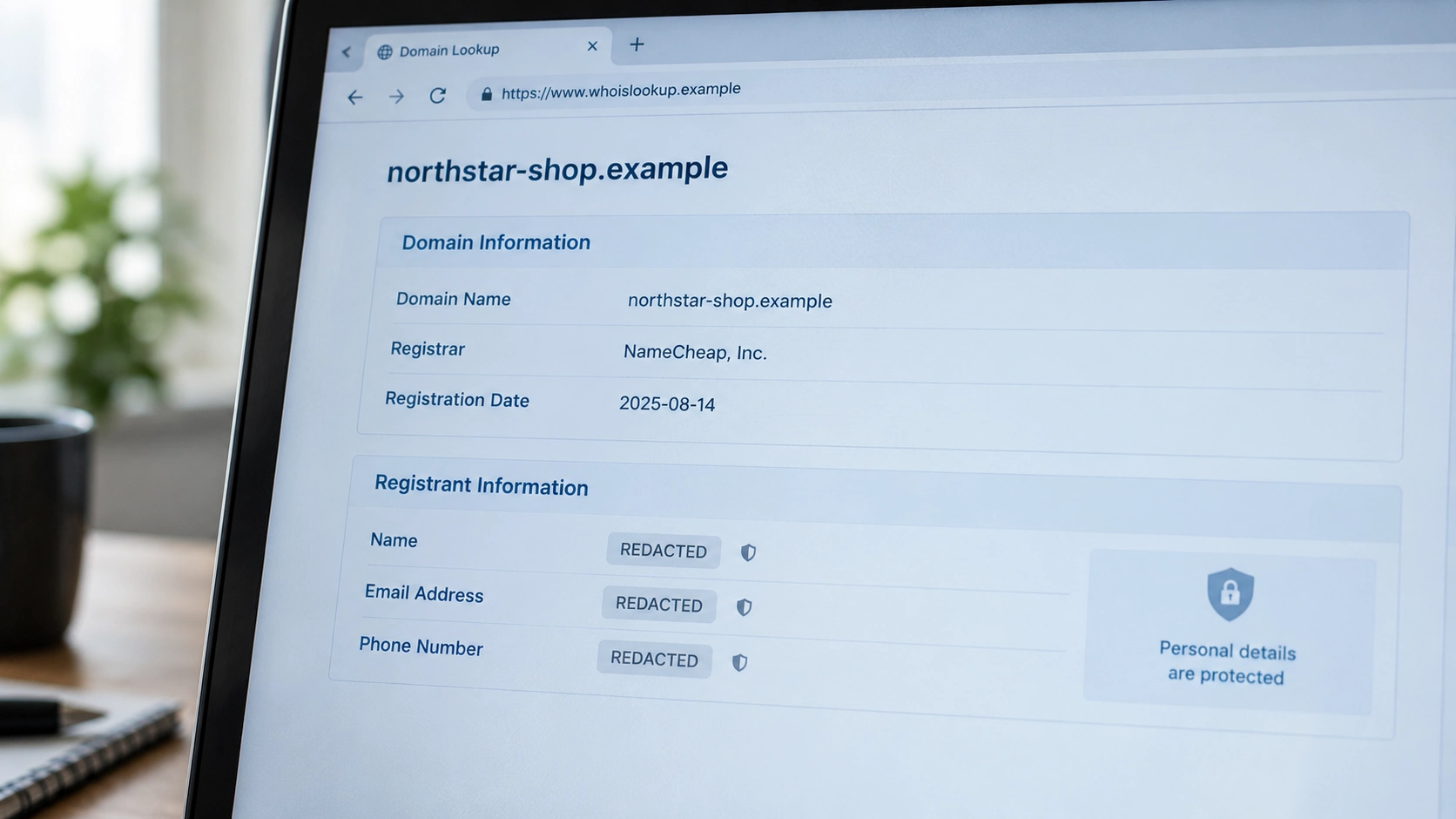
When you search “who owns this website?”, you will often see the word REDACTED. That means the details are hidden on purpose. There are three main reasons:
- Privacy laws. Since Europe’s GDPR privacy law started in 2018, many registrars hide personal details by default.
- Privacy services. Many people pay a small fee, or get free privacy, so spammers cannot collect their home address and phone number.
- Safety. Bloggers, small business owners and families do not want strangers knowing where they live.
Hidden details are normal. Many honest websites, including small blogs, hide them. But a hidden owner plus other warning signs is a reason to slow down.
Can anyone ever see the hidden details? Sometimes. People with a real legal reason, like police or lawyers, can ask through ICANN’s Registration Data Request Service (RDRS). The registrar decides whether to share the information, so there is no guarantee.
Worried about your own details being public online? Our guide on how to remove personal information from the internet can help.
A simple example: checking an online shop
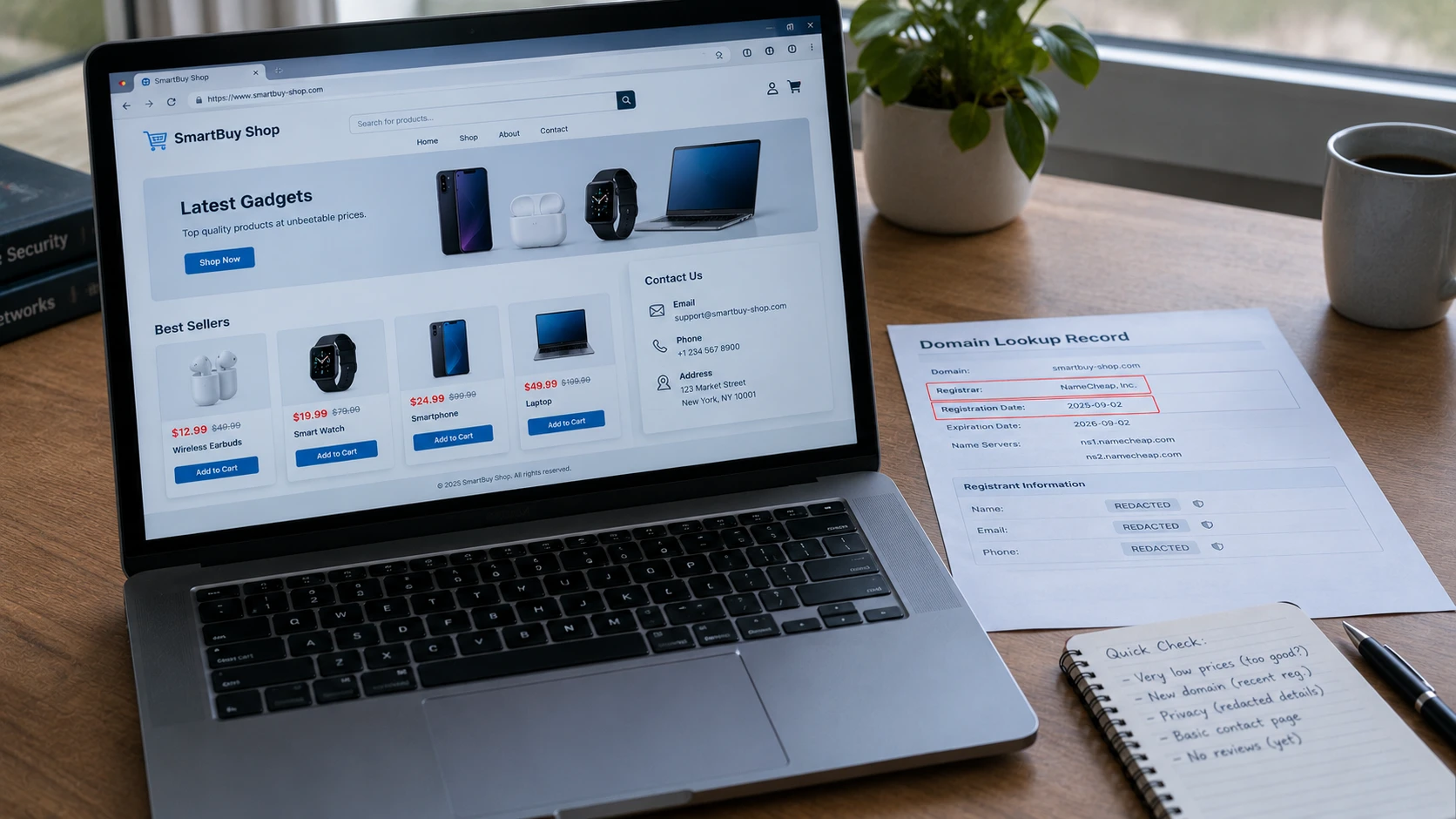
Let’s walk through a made-up example. Ali finds a gadget shop selling smartwatches for $19. The normal price is over $150. He wonders, “Who owns this website?” So he checks:
- Domain lookup: the domain was registered only three weeks ago.
- Owner details: all hidden.
- Contact page: only a free email address and no real street address.
- Wayback Machine: no older copies of the site at all.
- Reviews: nothing, except one forum post saying “never got my order”.
One clue alone would not prove anything. But together, they tell Ali this shop is very likely a scam. He closes the page and keeps his money.
Why does the age of a website matter?
When you check who owns this website, the creation date is one of the most useful clues. Here is why.
Scammers often build a fake shop, use it for a few weeks, and then throw it away once people start complaining. Then they buy a new domain and start again. That is why many fake shops are only days or weeks old.
Real businesses are different. A bakery, a phone shop or a news site usually keeps the same website for years. So if a domain is ten years old and has a long history on the Wayback Machine, that is a good sign.
But remember, age is only one clue:
- Old domain + good reviews = usually safe.
- New domain + normal prices + real contact details = could be a new honest business. Check more.
- New domain + crazy discounts + no contact details = big warning sign.
Scammers can also buy old, expired domains to look more trusted. So always combine the domain age with the other checks in this guide.
Red flags to look for
When you check who owns a website, watch for these warning signs:
- The domain is only days or weeks old, but the site claims years of history.
- Prices are much lower than everywhere else.
- There is no real address or phone number.
- The website name is a slightly misspelled version of a famous brand.
- The site only accepts crypto, gift cards or bank transfers.
- The site was shared by a stranger on social media. Learn how to spot a fake social media account.
Scammers also send fake website links by text and email. See how to tell if a message is a scam. Some fake sites are even hosted on hacked computers that are part of a botnet. Read what is a botnet to understand how that works.
Who owns this website? A 1-minute checklist
Save this short list and use it before you buy from a new website:
- Run a free domain lookup. When was the domain created?
- Read the About and Contact pages. Is there a real company and address?
- Check the Wayback Machine. Did the site exist before this month?
- Search for reviews and complaints.
- Look at the payment options. Are card payments with buyer protection available?
If you can answer these five questions, you will usually have a good idea of who owns this website, or at least whether it is safe to trust. That is often more useful than knowing the owner’s real name.
How to report a fake or harmful website
You do not need to know the owner’s name to report a bad site. Here is what you can do:
- Report to Google using its phishing report page, so browsers can warn other people.
- Report to the registrar. The domain lookup shows the registrar and usually an “abuse” email or link.
- Report to ICANN if the registrar does not respond, using ICANN’s complaint page.
- Report fraud to the authorities. In the U.S., use the FTC’s ReportFraud.ftc.gov. In other countries, contact your national cybercrime or consumer protection agency.
If you already clicked a bad link, follow our steps in what happens if I click a phishing link.
What you should not do to find a website owner
Finding out who owns a website should stay safe and legal. Do not:
- Try to hack or break into the website.
- Send threats or harass anyone you think is the owner.
- Post someone’s private details online, even if you think they are a scammer.
- Pay a “detective” website that promises to reveal any owner’s home address.
Use public tools, report problems to the right people and let them handle it.
Questions people ask
Can I find out who owns any website for free?
You can look up basic domain details for free with tools like ICANN Lookup. But the owner’s name and contact details are often hidden for privacy.
Does a WHOIS or RDAP lookup show the real website owner?
Sometimes. Companies often show their business name. Many individuals hide their details, so you may only see the registrar.
How do I find out who owns this website if the details are hidden?
Check the About and Contact pages, old versions on the Wayback Machine, reviews and company records. If you have a legal reason, you can request hidden data through ICANN’s RDRS, but sharing is not guaranteed.
Does a new domain mean a website is a scam?
No. Every real business starts with a new domain at some point. But a brand-new domain plus other red flags, like very low prices, is a warning.
Can I report a fake website without knowing who owns it?
Yes. You can report it to Google, to the registrar and to consumer protection authorities. You do not need the owner’s name.
Do all website endings use the same lookup?
Not always. Country endings, like .pk or .uk, are run by local organizations that may have their own lookup tools and rules.
Helpful links
- DeepHiDX: how to tell if a website is fake
- DeepHiDX: 9 free OSINT tools for beginners
- DeepHiDX: what is a botnet?
- DeepHiDX: is it safe to go on the dark web?
- DeepHiDX dark web glossary
- ICANN Lookup: free domain lookup
- ICANN: about RDAP
- ICANN: Registration Data Request Service
- Internet Archive: Wayback Machine
- ICANN: how to report domain abuse
- DeepHiDX: our sources and research
The short version
Here is everything above in a few lines you can share with a friend.
Who owns this website? Start with a free ICANN Lookup. It shows the registrar and the date the domain was created, even if the owner’s name is hidden.
Hidden details are normal, so check other clues: the About page, old versions of the site and reviews. A brand-new domain, crazy low prices and no real contact details together mean you should walk away.
If a site looks fake, do not argue or hack. Just report it and keep your money safe.



Comments