
By Ehtijad Ali
Updated: October 2026
Reading time: about 11 minutes
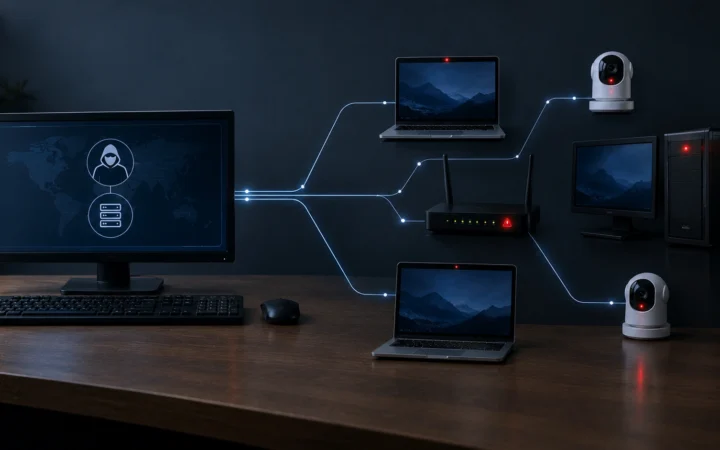
Infostealer malware is a sneaky program that copies your passwords and other private details from your computer, then sends them to criminals. It does not break things or show scary messages. It just quietly takes what it wants and leaves.
Many people think hackers must break into a big company to steal passwords. Today, that is often not true. It is much easier to steal them straight from one person’s computer. This guide explains how infostealers work, what they take, how people get them, and what you can do to stay safe. No tech skills needed.

What is infostealer malware?
Let us break the name into two parts. “Info” means information. “Stealer” means something that steals. So an infostealer is a program that steals information.
“Malware” is short for “malicious software”, which means software made to do harm. So infostealer malware is harmful software that steals information from your device.
Here is an easy way to picture it. Imagine a pickpocket who does not take your wallet. Instead, they quietly photocopy your house keys, your bank card and your ID, then put everything back. You would not notice anything was wrong. But now someone else can open your doors. That is what an infostealer does to your online accounts.
How is it different from a normal virus?
Some harmful programs want you to notice them. Ransomware, for example, locks your files and demands money. An infostealer is the opposite. It wants to stay hidden. Your computer may keep working normally, so many victims never know they were infected.
7 things infostealer malware steals
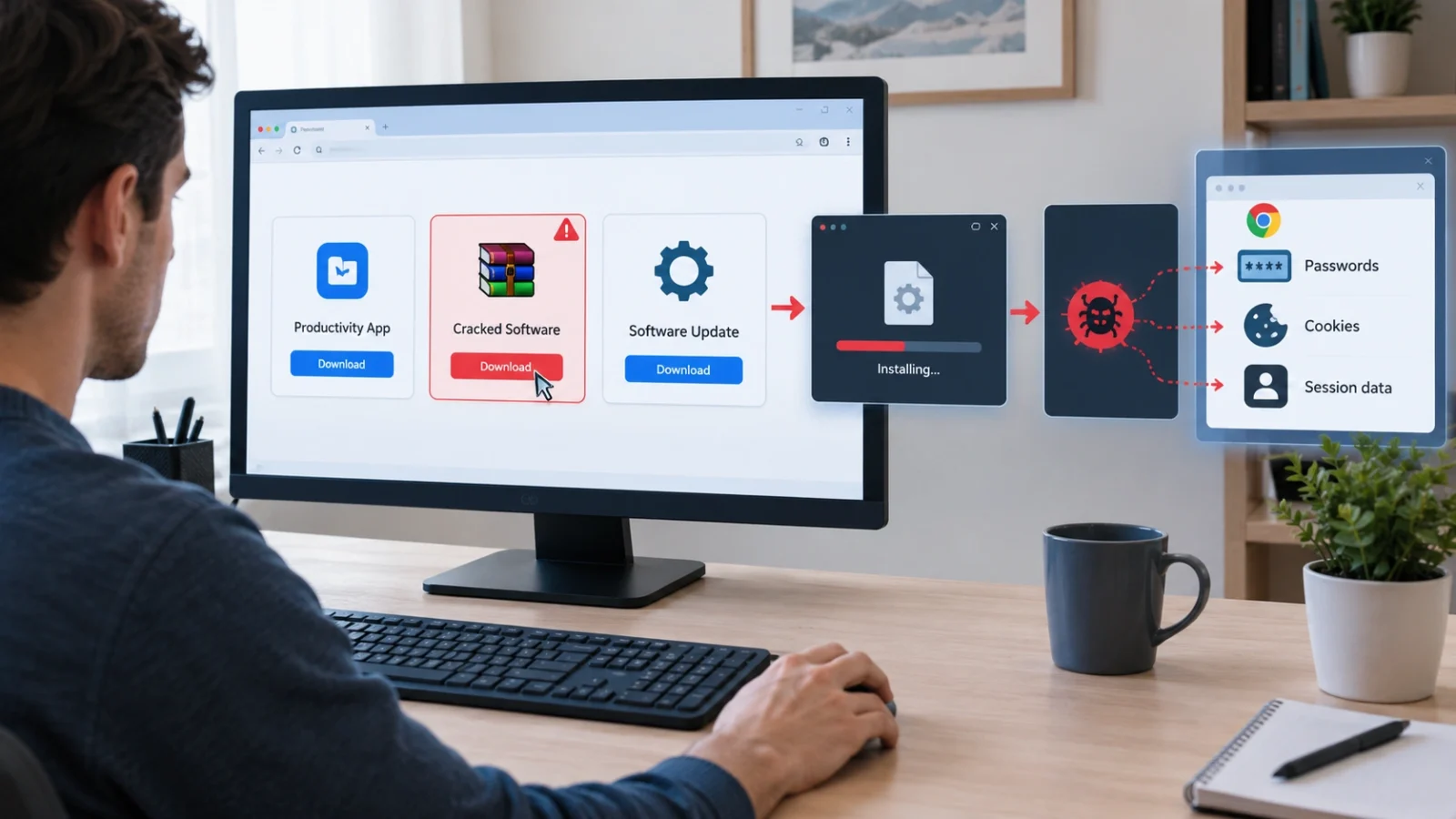
Think of your web browser as a small backpack. It carries lots of things that help you log in quickly. An infostealer opens that backpack and copies whatever looks useful. According to Microsoft’s research on Lumma Stealer, one of the most common infostealers, these are the main targets:
- Saved passwords. Every password you told your browser to “remember”.
- Cookies. Small files that keep you logged in to websites. (More on why these are so dangerous below.)
- Autofill details. Your saved name, home address, phone number and sometimes card details.
- Crypto wallets. Files and browser add-ons that hold digital money like Bitcoin.
- Chat and app data. Some stealers grab data from apps like Telegram, email programs and VPNs.
- Documents. Some stealers search your folders for files that look valuable.
- Computer details. Your device type, its settings and the apps you have installed.
Put together, this is much worse than losing one password. It can be like handing over the keys to your whole online life.
How does infostealer malware get on your computer?
Most of the time, nobody “hacks” in. Instead, the victim is tricked into opening the door themselves. Here are the most common tricks:
- Cracked software and games. “Free” copies of paid programs are one of the biggest sources of infostealers.
- Fake downloads. A website pretends to offer a useful app, update or tool, but the file is malware.
- Bad adverts. A search ad or pop-up sends you to a fake download page.
- Phishing messages. An email or chat message asks you to open a file or click a link.
- Fake “I am not a robot” pages. This trick is called ClickFix. A fake check asks you to copy and paste a command into your computer. That command installs the malware.
- Fake files on trusted apps. Criminals also share harmful files through popular apps and websites that people trust.
Mac users are not safe either. In 2026, Microsoft warned that fake apps and copy-paste tricks were spreading infostealers to Mac computers too.
A simple rule: if a website ever asks you to paste a command into your computer to “prove you are human”, close it. Real websites never do that.
Why stolen cookies are so dangerous
This is the part most people do not know about, so let us go step by step.
When you log in to a website, it gives your browser a small “ticket” so it remembers you. This ticket is stored in a cookie. It is called a session. Thanks to it, you do not have to type your password every time you open a new page.
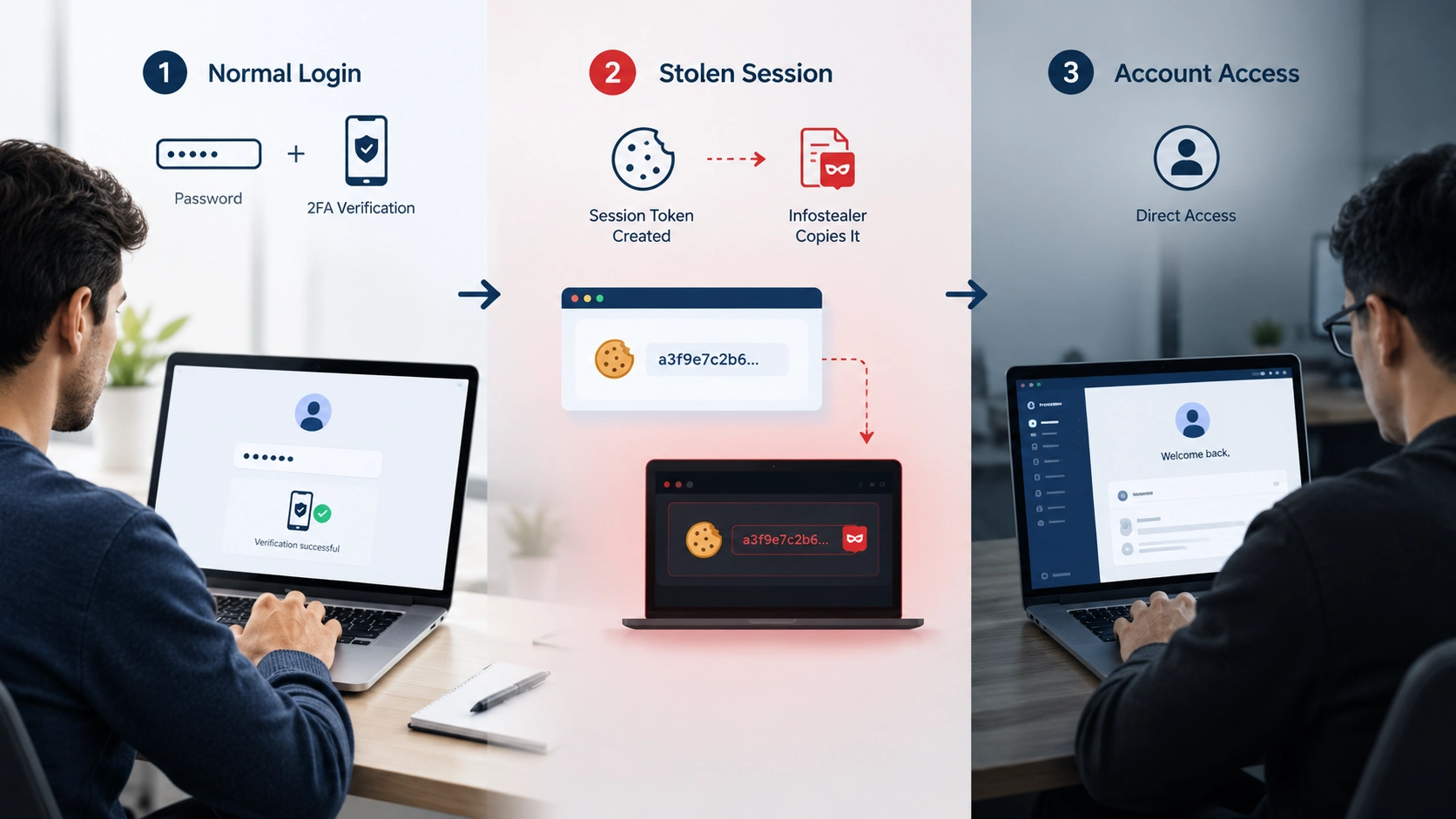
Now imagine a thief copies that ticket. They can load it into their own browser, and the website thinks they are you. They may not need your password. They may not even need your two-step code, because the website believes you already passed those checks.
This is not just a theory. In 2023, police shut down Genesis Market, a criminal shop that sold exactly these stolen sessions. You can read about it in our Dark Web Timeline.
Does this mean two-step login (2FA) is useless? No! Keep it on. It still stops many attacks. The strongest kinds, like passkeys and security keys, make attacks even harder. Just remember that 2FA works best together with a clean, malware-free computer.
Where does the stolen data go?
Once an infostealer has copied everything, it packs it into one bundle and sends it to the criminal. This bundle is called a stealer log. One log can hold hundreds of passwords from a single person.
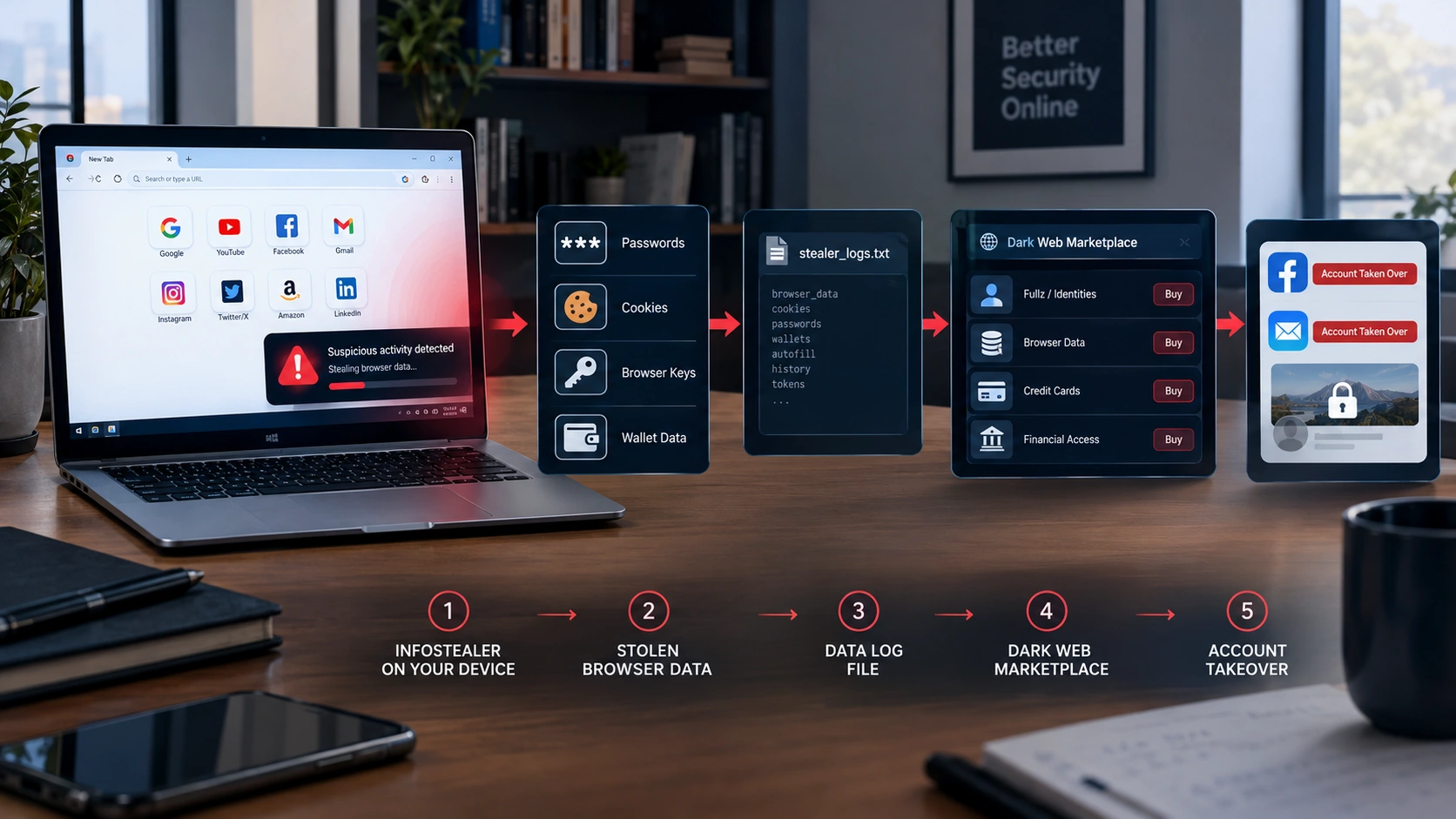
Then the logs are sold or shared. This happens on hidden dark web markets and, more and more, in chat apps. A study of criminal markets found that access to a stolen account often sold for only about $5 to $7. That is how cheap your online life can be to a criminal.
We explain how criminals moved this trade into chat apps in our guide Telegram Cybercrime: 5 Simple Reasons It Rivals the Dark Web. And to see how police have taken down whole dark web markets, read Operation Bayonet: 3 Brilliant Steps That Took Down AlphaBay.
After someone buys a log, they might break into email accounts, steal money, or use the account to trick your friends. Our guide What Do Hackers Do With Stolen Data? follows that whole journey.
A real example: Lumma Stealer
Lumma Stealer (also called LummaC2) was one of the most widely used infostealer malware tools in the world. Criminals could rent it, like renting a tool from a shop.
In May 2025, Microsoft worked with police, including the U.S. Department of Justice and Europol, to fight back. Together they took down, blocked or suspended about 2,300 website addresses that Lumma used to run. At the same time, the US cyber agency CISA and the FBI published an official warning about LummaC2 to help companies spot it.
The lesson? Even big malware tools can be disrupted. But criminals often rebuild or switch to a new stealer, so staying careful still matters.
How big is the infostealer problem?
Very big, and growing. Here are two facts from trusted research:
- Google’s security team, Mandiant, said in its M-Trends 2025 report that stolen passwords and logins were the second most common way attackers broke in during 2024. They made up 16% of the attacks Mandiant investigated, and the team linked this rise to infostealers.
- A 2026 research study looked at 170,298 victims of infostealers. It found that many people reused the same passwords, which made it easy for criminals to break into more of their accounts.
In simple words: infostealer malware is now one of the main reasons accounts get hacked. And because it is cheap to rent and easy to spread, experts expect it to stay a big problem for years.
Who do infostealers target?
Short answer: everyone. Infostealer malware is not picky. They grab whatever they find, then criminals sort out the valuable parts later. But some groups are hit more often:
- Gamers. Cheats, mods and “free” game copies are a favourite hiding place for infostealers. The 2026 study found gaming and entertainment accounts were hit especially hard.
- Crypto owners. Wallets on a computer can be emptied quickly, and crypto is hard to get back.
- Office workers. One work password can open the door to a whole company.
- Content creators. Stolen YouTube, Instagram or TikTok accounts can be sold or used for scams.
- Students. Many download free software for school projects without checking where it came from.
- Small businesses. They often have no security team, so one infected laptop can go unnoticed for months.
A simple story: one download, many hacked accounts
This story is made up, but it shows a very common path.
- Mia wants a paid photo editing app for free. She finds a “cracked” copy and installs it.
- The app opens and seems fine. But hidden inside is infostealer malware.
- In under a minute, it copies the passwords and cookies saved in her browser and sends them away.
- A few days later, her stealer log is sold online for a few dollars.
- The buyer uses her saved email cookie to get into her inbox, then resets her other passwords from there.
Mia never typed her password on a fake website. She never shared her 2FA code. One download was enough. That is why the safety tips below matter so much.
Warning signs of infostealer malware
Infostealers are built to hide, so it can be hard to know for sure. But watch out for these clues:
- Your security app warns you about a strange program.
- You get “new sign-in” alerts that were not you.
- You get password reset emails you did not ask for.
- Friends say they got odd messages from your account.
- Strange add-ons appear in your web browser.
- Problems started soon after you installed a cracked game or an unknown program.
One clue alone does not prove anything. But if you see a few of them, act quickly.
What to do if you think you are infected
Do not panic, and do not keep using the computer as if nothing happened. Follow these steps in order:
- Disconnect from the internet. Turn off wifi or unplug the cable. This stops the malware from sending more data.
- Use a different, clean device. Use another phone or computer for the next steps.
- Change your most important passwords first. Start with your email, then banking, then everything else. Use new passwords, not old ones.
- Log out everywhere. Many sites have a “sign out of all devices” button. This makes stolen session cookies useless.
- Turn on two-step login. Use an app, a security key or a passkey if the site allows it.
- Clean the infected computer. Run a full scan with a trusted security tool. If you are unsure, ask a professional, or reset the computer completely.
- Check if your details are already out there. You can check if your email was in a data breach.
If the computer is used for work, tell your company’s IT team straight away. They may need to protect other people’s accounts too.
How to protect yourself from infostealer malware
Good news: a few simple habits stop most infostealers before they start.
- Only download from official places. Use the real company website or a trusted app store.
- Never use cracked software. “Free” paid programs are a top way infostealers spread.
- Keep everything updated. Updates fix the holes that malware uses.
- Use a password manager. It creates a different password for every account. Learn more in our glossary.
- Turn on two-step login or passkeys for your important accounts.
- Never paste commands into your computer because a website told you to.
- Think before you click on unexpected files, links or browser add-ons.
- Keep your security app switched on. Windows and Mac both have one built in.
Many people also think a VPN keeps them safe from this. It does not. A VPN hides your connection, but it cannot stop malware that is already on your computer. Read Do VPNs Make You Anonymous? to see what a VPN really does.
Frequently asked questions
What is infostealer malware in simple words?
It is a harmful program that secretly copies private information, like passwords, cookies and crypto wallets, from your device and sends it to criminals.
Can infostealer malware get past two-step login (2FA)?
Sometimes. If it steals a session cookie from a site you are already logged in to, a criminal may get in without the code. That is why you should also log out of all devices and keep your computer clean. 2FA is still very important, so keep it on.
Is cracked software a common way to get infected?
Yes. Cracked programs and games are one of the most common ways infostealers spread, along with fake downloads, bad adverts and fake “I am not a robot” pages.
Can Macs and phones get infostealers?
Yes. Most infostealers target Windows computers, but Mac infostealers are growing fast. Phones can also be targeted through fake apps.
How do I remove infostealer malware?
Disconnect from the internet, change your important passwords from a clean device, log out of all sessions, and run a full scan with a trusted security tool. If you are not sure it is gone, reset the computer or get professional help.
Does an infostealer mean all my accounts were hacked?
Not always. It means your details may have been copied. Change your passwords, log out everywhere and watch for strange activity to stop criminals from using them.
Sources
We used these trusted sources. You can read how we choose sources on our Sources and Research page.
- CISA and FBI – Advisory AA25-141B: LummaC2 malware
- Microsoft – Lumma Stealer: delivery techniques and capabilities (2025)
- Microsoft – Infostealers without borders: macOS and Python stealers (2026)
- Google Cloud / Mandiant – M-Trends 2025
- arXiv – A data-driven analysis of infostealer malware victims (2026)
- arXiv – Malware finances and operations: the value chain for infections and compromised access
The short version
Infostealer malware quietly copies your passwords, cookies and other private data, then sends them to criminals. It usually gets in when someone downloads cracked software, a fake app, or follows a fake “I am not a robot” page. The stolen data is sold cheaply and used to break into accounts, sometimes even past two-step login.
To stay safe, download only from official places, never use cracked software, keep things updated, use a password manager, and turn on two-step login. If you think you are infected, disconnect, change your passwords from a clean device, and log out everywhere.


Comments